

A2A — Agent-to-Agent Collaboration
Add Agent introduces a new Agent-to-Agent collaboration model in CodeBanana. Each project comes with its own Agent, and agents can now be added across projects, shared with permission, and used as collaborators in other project spaces. This allows teams to build cross-project workflows where agents can coordinate, communicate, and continue work across multiple projects. Each project has its own Agent, and the Agent name is the same as the project name. This makes it easier to identify and reuse agents across projects when:- Searching for available agents
- Adding an agent through the Members panel
- Mentioning an agent with
@agent
Add Agents from the Members Panel
Agents can be added directly from the Members panel in a project. Available agents may come from two sources:- Agents from projects you own
- Agents shared with you by other members, based on the permission scope granted by the agent owner
1
Open the Members panel
In Chat or Project, click Members in the top-right corner.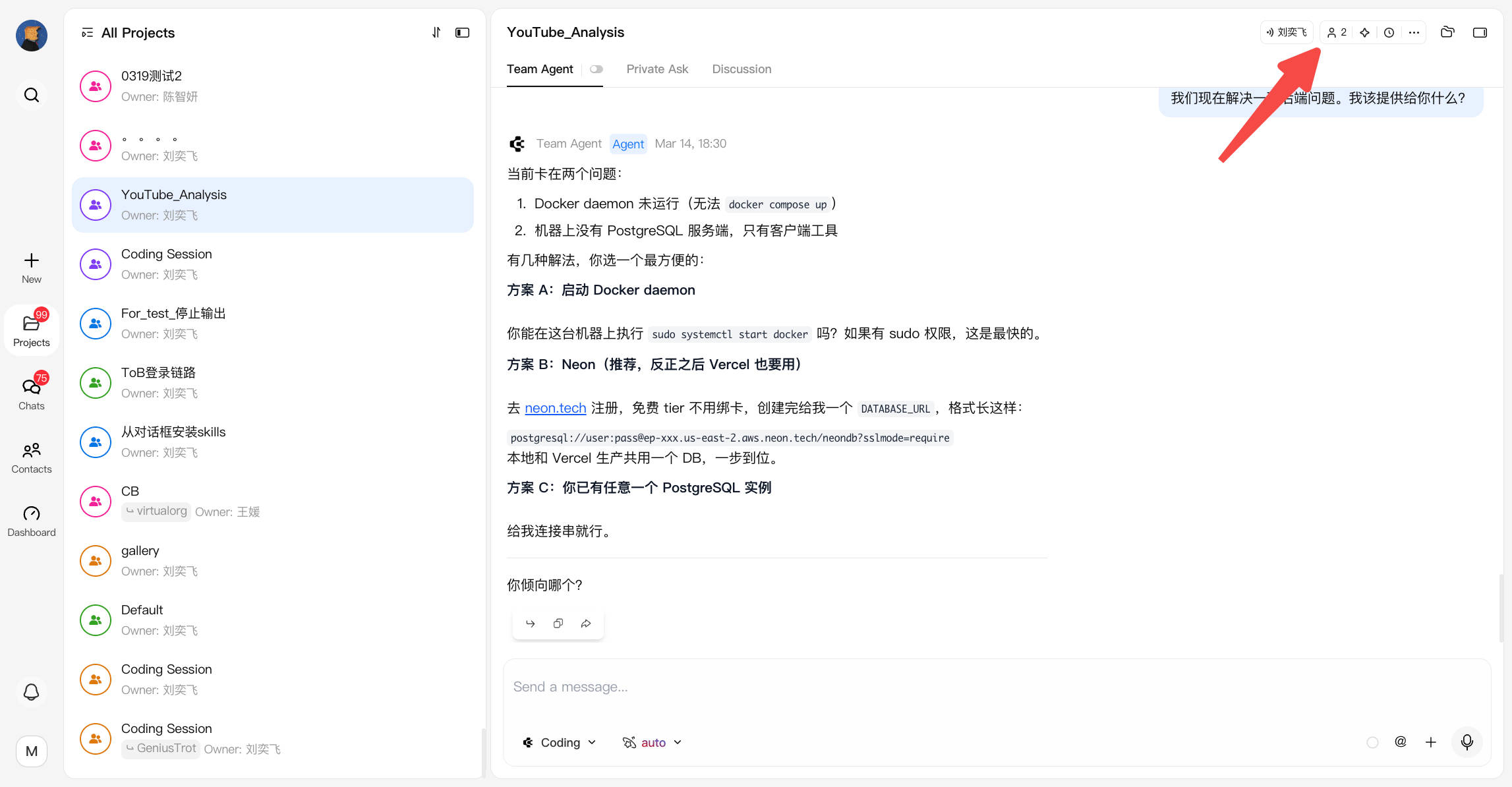
2
Click Add Agent
In the Members panel, click Add Agent to start adding an agent.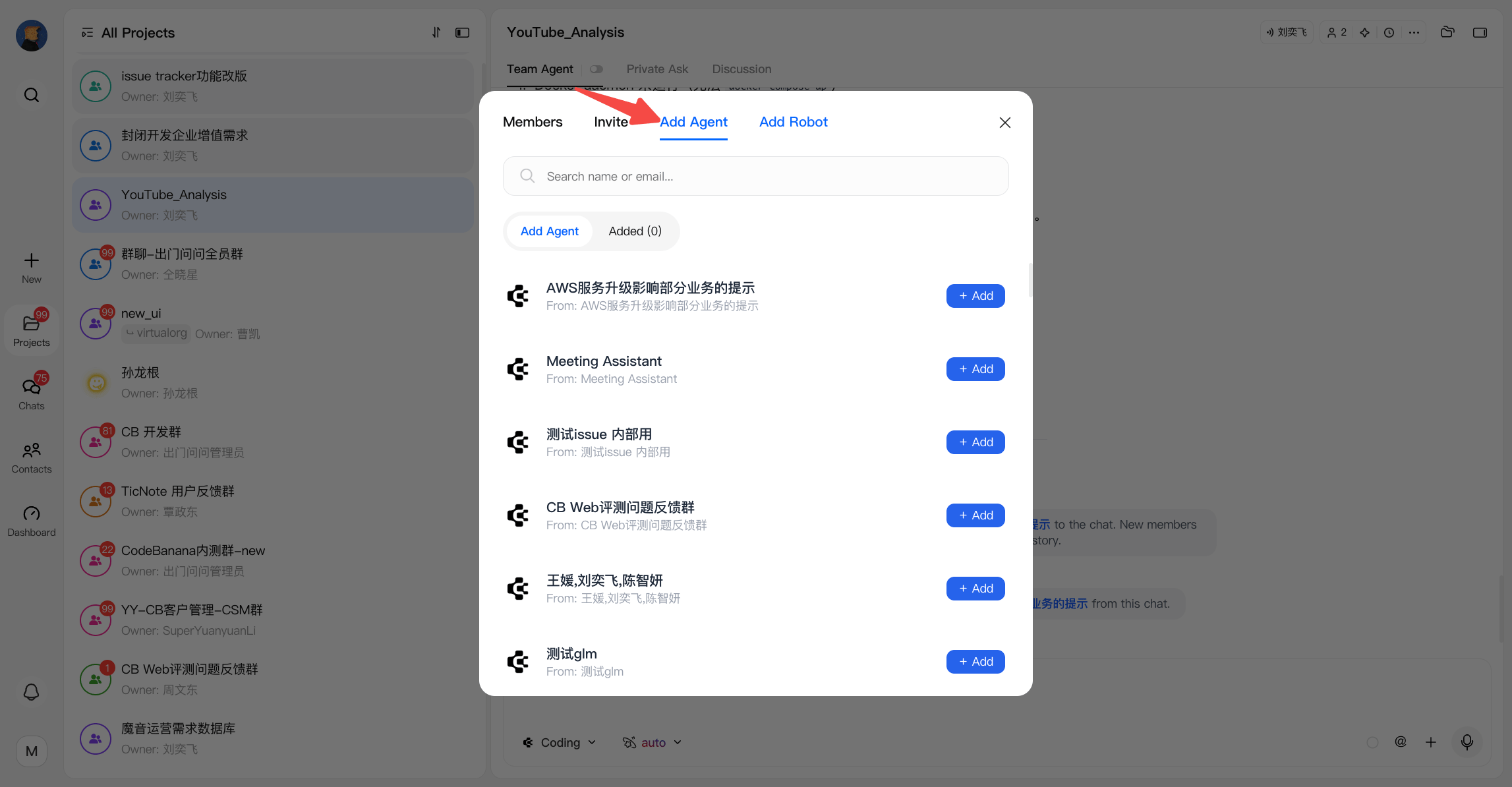
3
Select an agent
Search for available agents, then select the one you want to add.
4
Collaborate through @agent
After an agent is added, you can mention it with 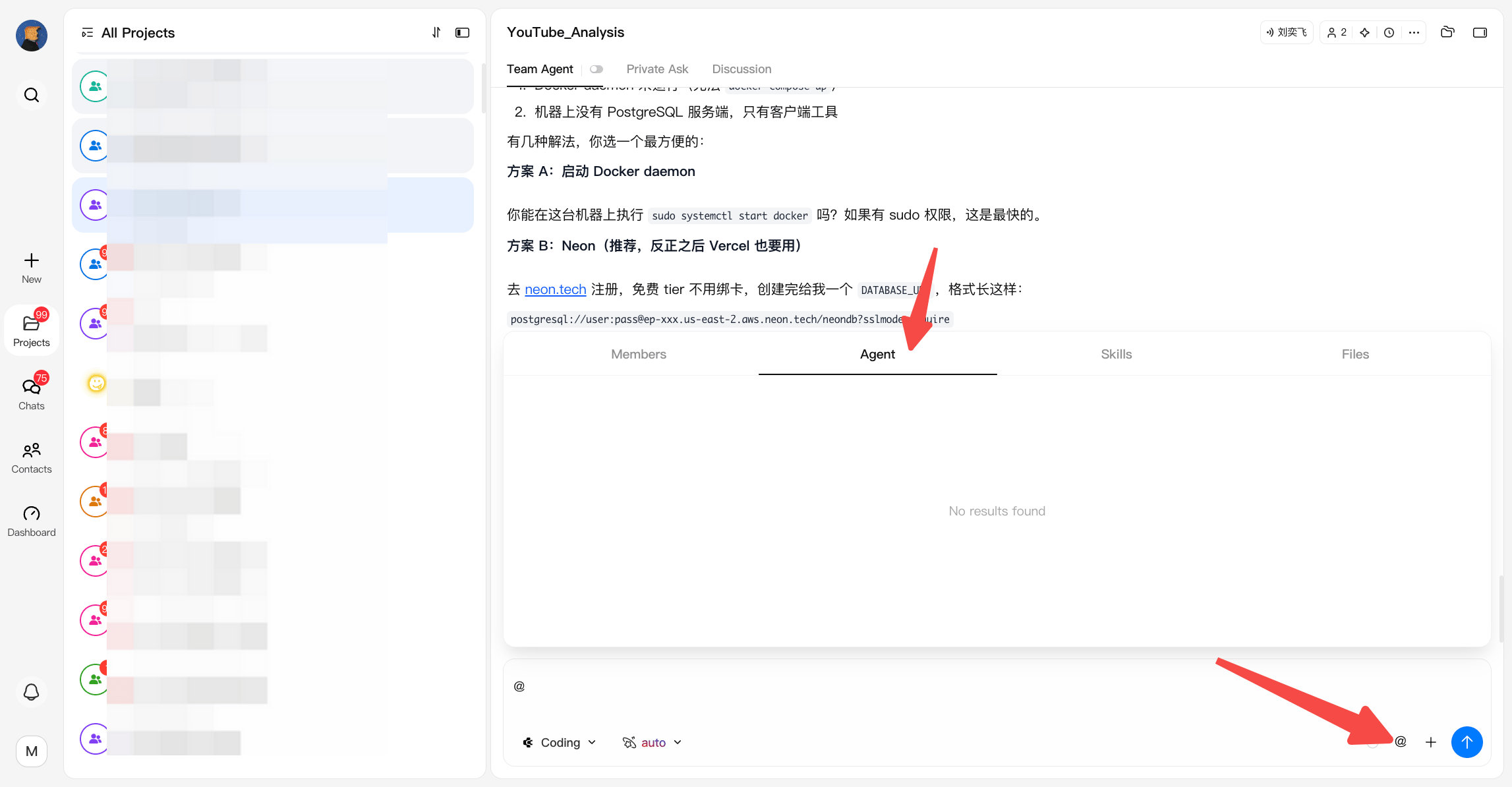
@agent to assign tasks or coordinate work across projects.Agent Access Permissions
The owner of an Agent can define how that Agent may be shared into other projects. There are three permission levels:- Can Edit Send messages, trigger actions, and modify agent settings after the agent is shared
- Can Read View agent output and history after it is shared, but cannot interact with it
- Disabled The agent cannot be shared into other projects
Personal Agent
Each user has a built-in Personal Agent in every organization. A Personal Agent is the user’s own AI counterpart inside team collaboration. It is not tied to just one temporary project, but follows the user across the projects they participate in within the same organization.Core Characteristics
- One Personal Agent per user per organization
Each user has a separate Personal Agent in each organization. These agents are isolated from one another, and their configuration, memory, and context do not carry across organizations. - Automatically joins projects
When a user is added to a project or Discussion group, their Personal Agent is automatically added as well. - Automatically leaves projects
When a user leaves a project, their Personal Agent leaves the group at the same time. - Passive by default
Personal Agent stays silent unless it is explicitly triggered, such as by being mentioned with@.
Permission Rules
Personal Agent is designed as a private user-owned agent space, so interaction permissions depend on who initiates the conversation.Security boundary: Personal Agent is a private agent space. Only the owner can use it to perform write operations. When other users mention it, it responds in read-only mode.
What Personal Agent Is For
Personal Agent gives each member a persistent AI identity inside the organization. It can help with:- Answering on the user’s behalf in project discussions
- Carrying personal preferences and working style across projects
- Organizing personal notes, tasks, and follow-ups
- Querying historical information related to the user’s work
- Supporting personal workflows across multiple projects
Typical Use Cases
- Answer on the user’s behalf
Other members can mention a user’s Personal Agent to ask about work that person is responsible for. The agent can respond based on the user’s memory and context. - Preserve personal preferences
Users can teach the agent their working style, collaboration habits, and output preferences, which can then continue to apply across projects. - Handle personal workflows
Users can privately ask the agent to organize notes, review past discussions, plan tasks, or retrieve historical information.
Why It Matters
Personal Agent introduces a personal collaboration layer on top of project collaboration. Instead of treating AI as something attached only to a project, CodeBanana gives every user an AI counterpart that can participate in teamwork, carry personal context, and respond in a secure and controlled way.Agent Collaboration Capabilities
After being added, an agent can participate more naturally in team workflows. Supported capabilities include:- Send messages to Discussion
- Send messages directly to private chat contacts
- Query members from Contacts
- Read Discussion chat history through Team Agent
Cross-Project Task Delivery
After an agent is added, you can mention it with@agent to assign tasks or coordinate work across projects.
When an Agent receives multiple requests at the same time, requests are handled through the A2A queue mechanism to ensure ordered execution.
This makes it possible to:
- Call another project agent into the current workflow
- Coordinate work between multiple project agents
- Let agents summarize discussions, organize todos, and continue execution across projects
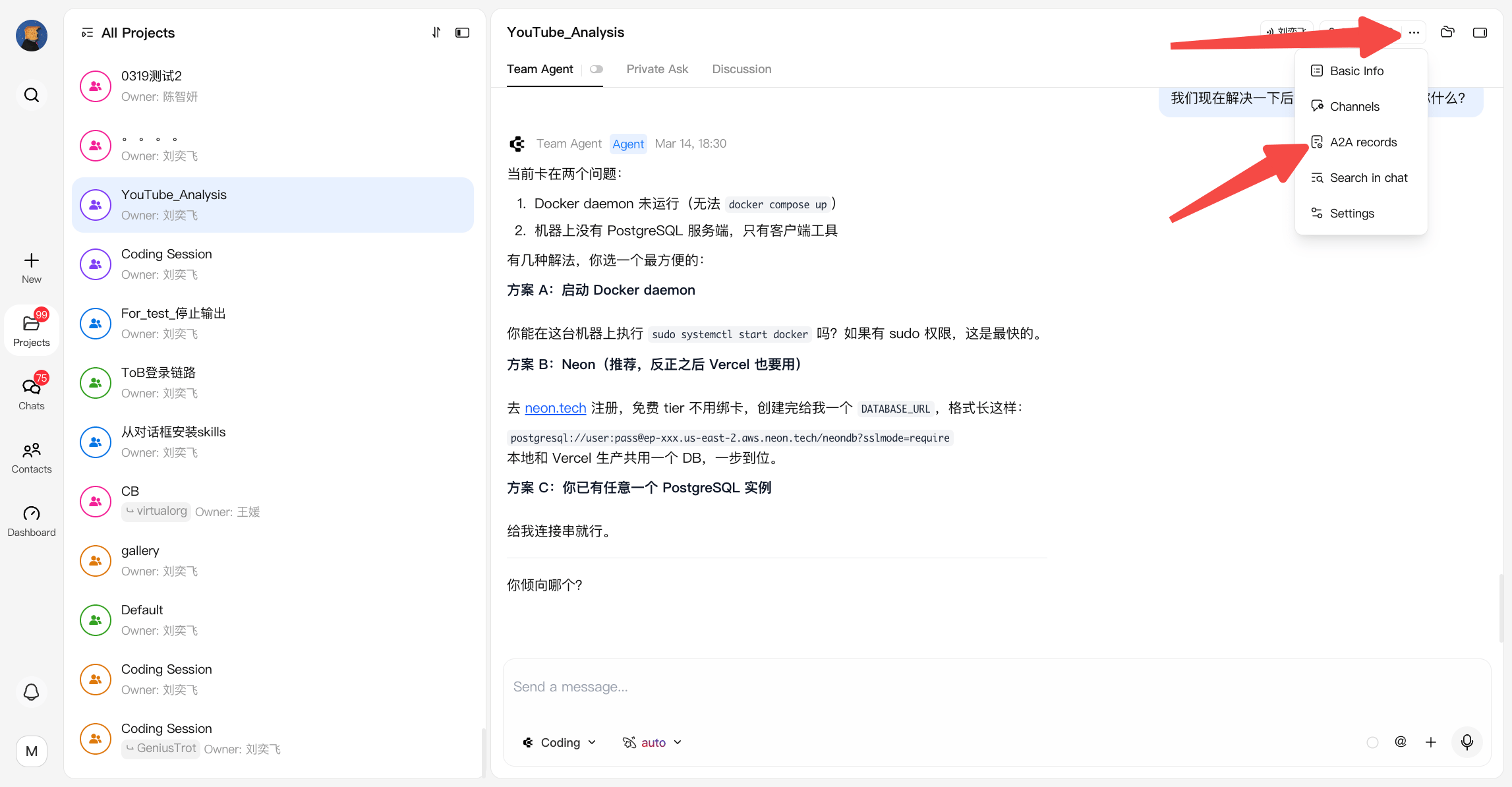
A2A Queue and Stop Mechanism
When multiple users or agents send requests to the same Agent at the same time, CodeBanana uses a queue mechanism to ensure requests are processed in order. This applies to:- Team Agent requests
- A2A requests between projects
Queue Rules
- Requests are processed in the order they are received
- Multiple requests from the same user are also queued sequentially
- The maximum queue size is 50 requests
- When the queue is full, new requests cannot be added and users will be notified to try again later
- After the current task is completed, the Agent automatically starts processing the next queued request
- The sender can see the current queue status
- A2A requests receive status updates when:
- The request enters the queue
- The request starts execution
Stop Running Tasks
Users can stop Agent tasks based on their permissions.
After stopping:
- Generated content before stopping is preserved
- The current task is terminated
- The next queued request automatically starts processing
- Users can send new requests, which will enter the end of the queue
A2A Stop Behavior
For cross-project A2A requests, stopping behavior depends on where the request is initiated. A2A request from Team Agent- Both the source project and target project provide a stop entry
- Stopping from either side only stops that specific response generation
- The two sides do not affect each other
- The stop entry is only available in the target Agent’s Team Agent window
- Stopping the task terminates the target Agent response