

What is Team Plan
Team Plan is a flexible organization subscription that centralizes seats, compute resources, AI usage, and administration in CodeBanana. It allows organizations to manage:- Customizable seat quantities
- Seat-specific VM configurations
- A shared Budget Balance
- Member on-demand limits
- Available models and reusable model templates
- Organization-level billing and usage records
Get Team Plan
Team Plan can be purchased from Pricing → Team Plan.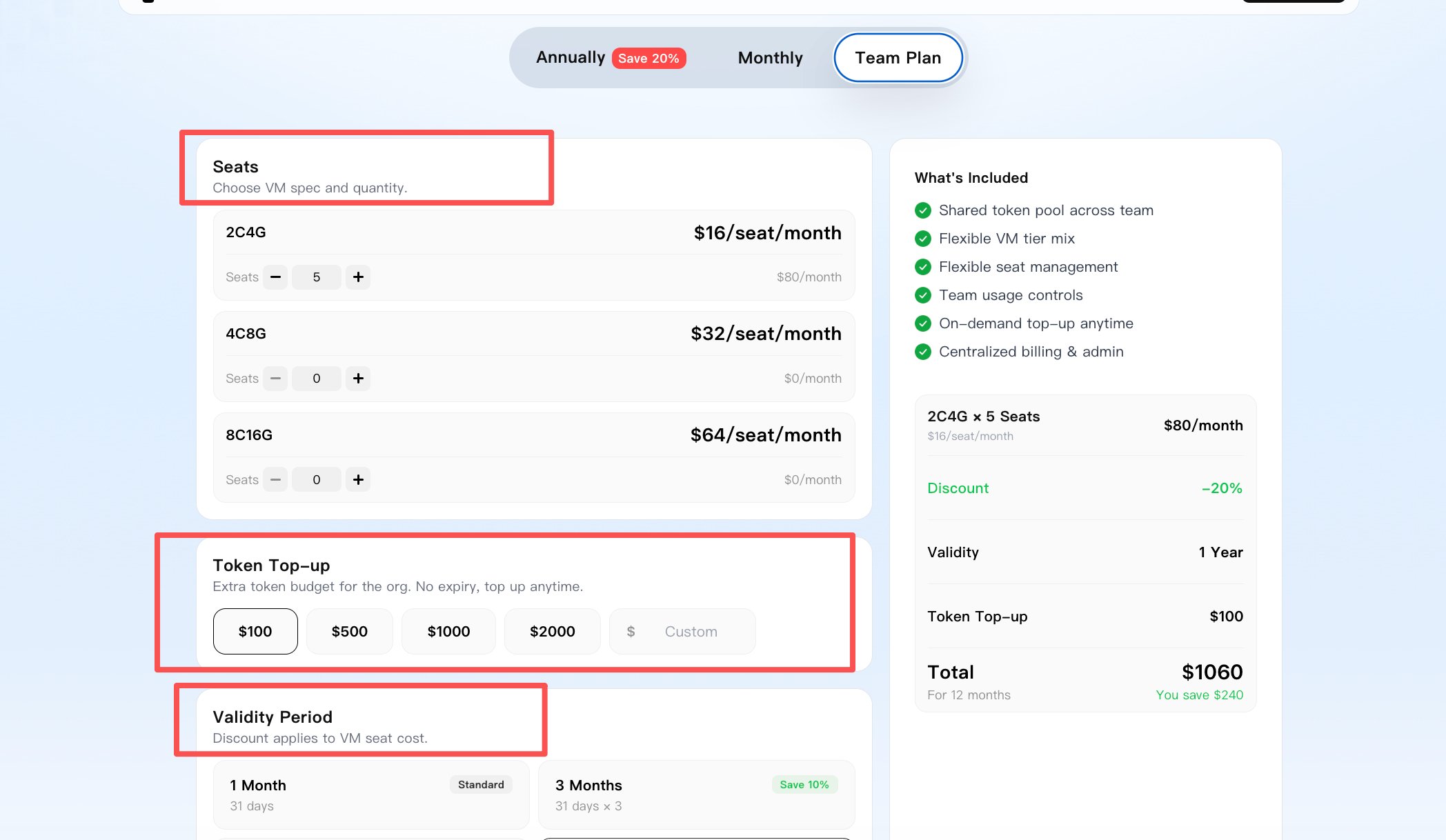
Seats and Budget Balance
Seats and AI usage balance are purchased separately.- Seat quantity can be selected based on organization needs
- A minimum of 1 seat is required
- Each seat costs $20 / month
- AI usage is deducted from the organization’s shared Budget Balance
- Budget Balance starts from $100
- Budget Balance does not expire and can be topped up later
Validity period
Team Plan supports multiple validity periods:- 1 month
- 3 months
- 6 months
- 12 months
VM configurations
Seats are associated with specific VM configurations. Available VM tiers include:- 2 vCPU / 4 GB RAM
- 4 vCPU / 8 GB RAM
- 8 vCPU / 16 GB RAM
Usage Entry
After purchasing Team Plan, organization Owners and Admins can manage seats, Budget Balance, usage, and members from Avatar → Usage. The Usage page provides access to:- Seat usage and availability
- Shared Budget Balance and AI consumption
- Member-level limits and usage
- Model permissions
- Team Plan renewal
- Additional seat purchases
- Budget Balance top-up
- Seat and balance records
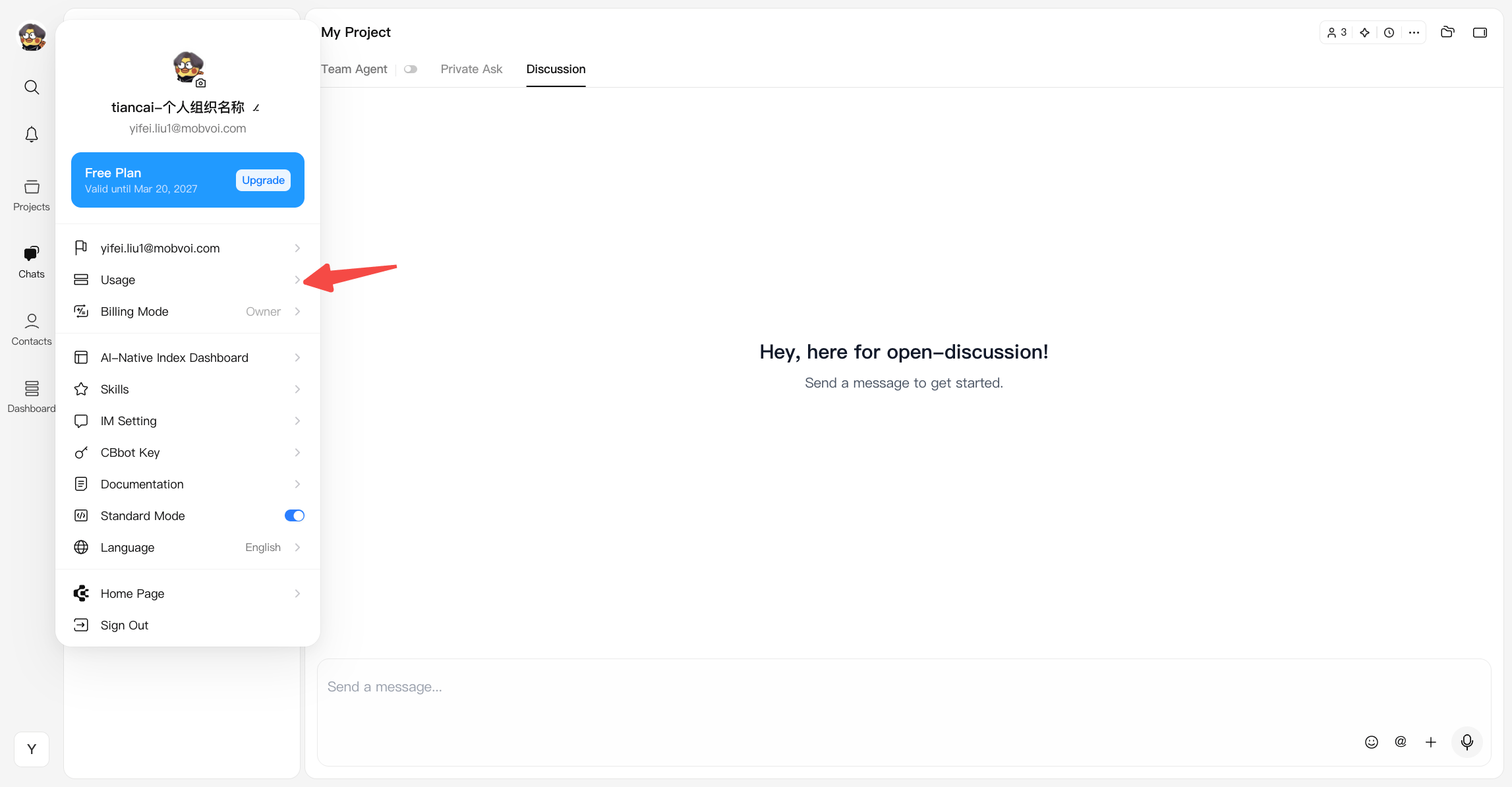
Usage Management
The Usage page provides organization-level management for Owners and Admins, while allowing members to view their own available usage and VM resources.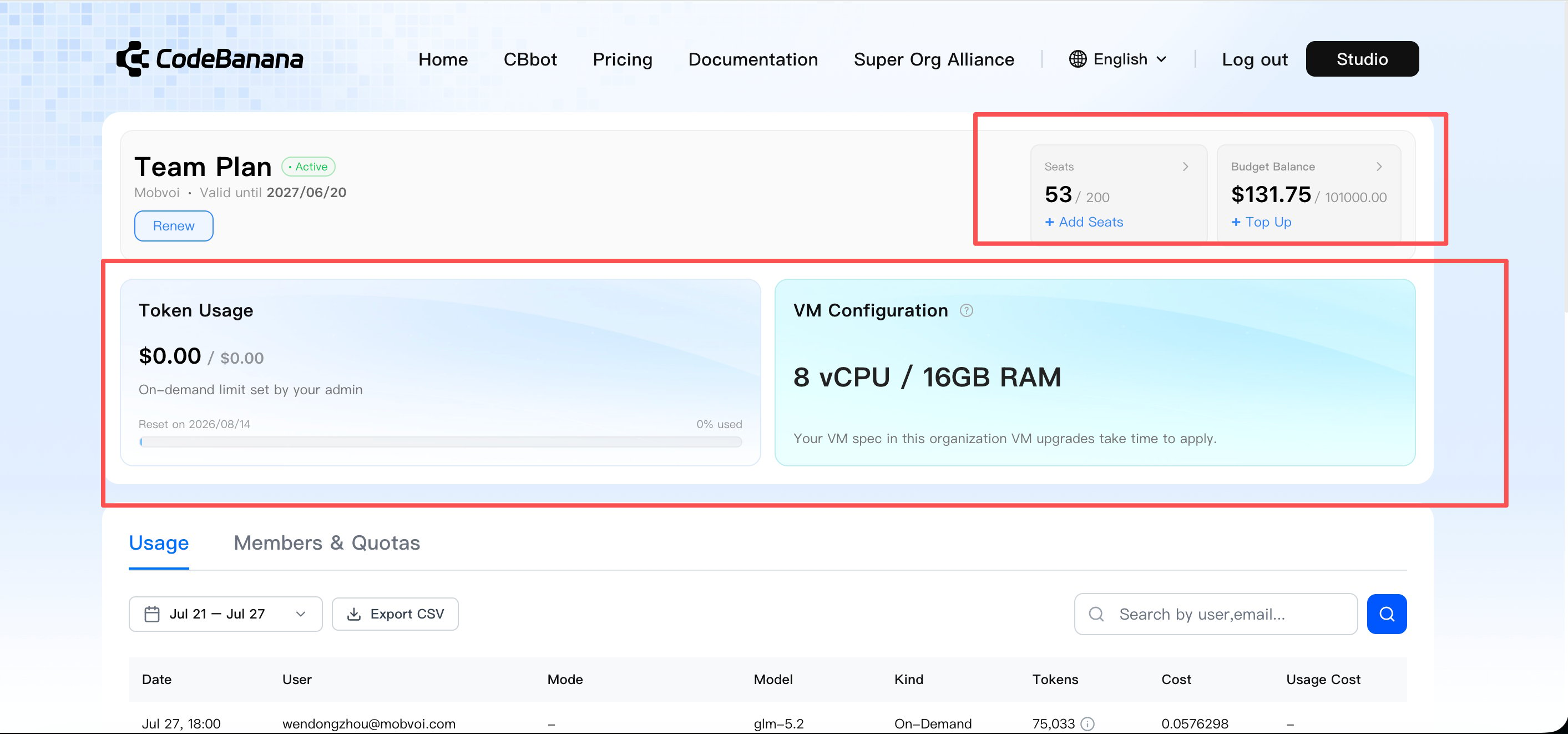
Usage Alerts
CodeBanana provides Team Plan usage alerts for member on-demand limits and the shared organization Budget Balance. Member on-demand limit- A reminder is shown when a member’s remaining on-demand limit is 10% or less and no more than $10
- Each user receives this reminder at most once per day
- Reminders are evaluated independently for each user
- The user is asked to contact the organization Owner or Admin before usage is interrupted
You’re almost at your on-demand limit (% used). Reach out to your organization owner or admin to increase your limit before usage is interrupted.Shared organization Budget Balance
- A reminder is shown when the remaining Budget Balance falls below 10%
- The reminder is intended for the organization Owner or Admin so the balance can be topped up in time
Your organization’s shared token budget is almost depleted — $ left. Please contact your organization owner or admin to top up soon and keep your team running smoothly.
Team usage (Admin view)
Organization Owners and Admins can view:- Seats used and available
- Seat availability by VM configuration
- Shared Budget Balance
- Organization-wide AI usage
- Member usage and on-demand limits
- Seat records
- Budget transaction history
- Add seats
- Top up Budget Balance
- Renew Team Plan
- Open Members & Quotas
- Review seat and balance changes
Personal usage (Member view)
Each Team Plan member can view:- Current token usage
- Available on-demand limit
- Current VM configuration
- Limit reset time
- Team Plan expiration information available to them
Admin Controls
Organization Owners and Admins can manage Team Plan configuration, members, billing behavior, models, limits, and VM resources.Add members to Team Plan
Go to Usage
Open Members & Quotas
Click Add Members
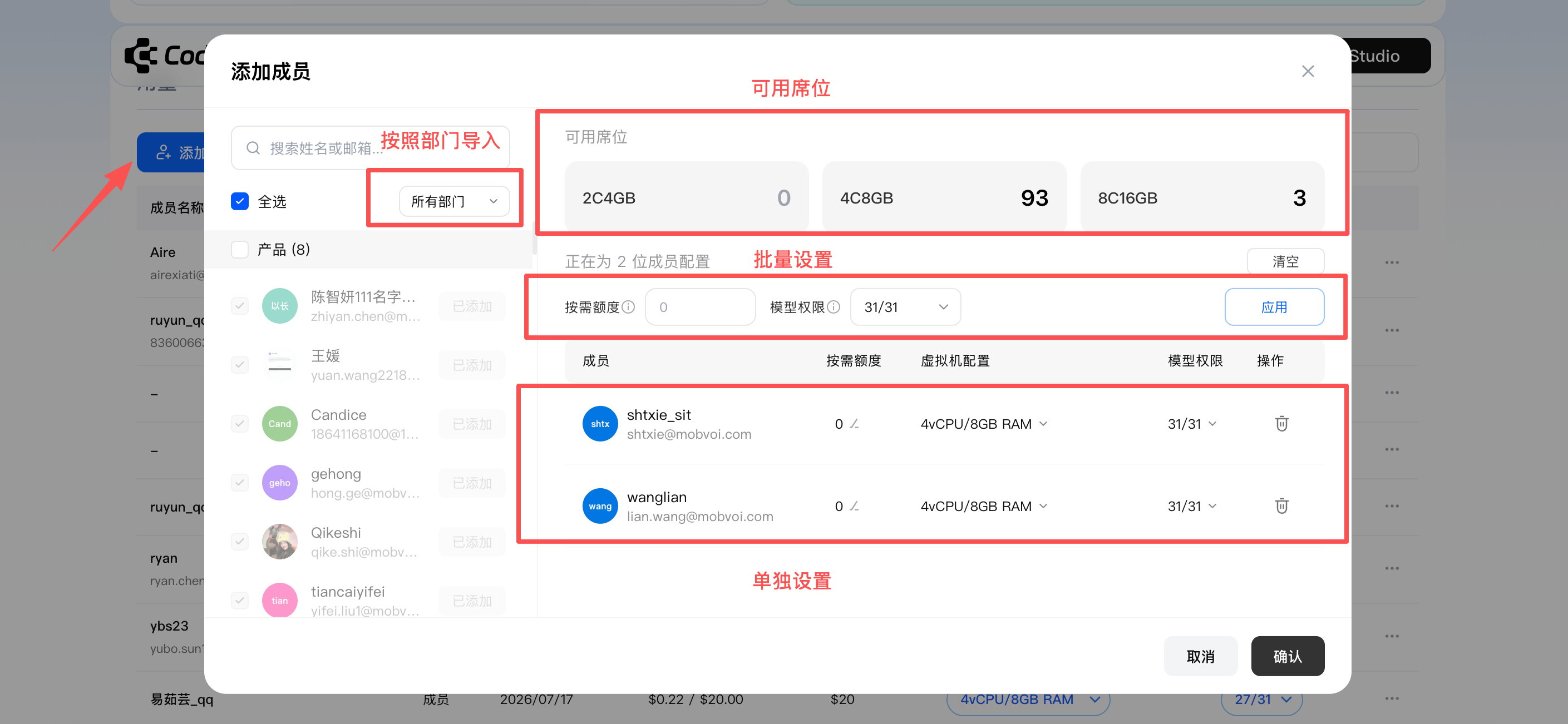
Configure members
- Filter organization members by department
- View available seats for each VM configuration
- Assign members to available seats
- Configure on-demand token limits
- Apply model permissions or model templates
- Adjust individual members separately when needed
How to join an Organization?
Billing mode
Billing Mode determines whose usage identity is used when AI costs are attributed inside the organization. Organization Owners and Admins can change the organization’s Billing Mode. Where to configure- Click your avatar in the top-right corner
- Select Billing Mode
- Choose a billing mode
- Click Save
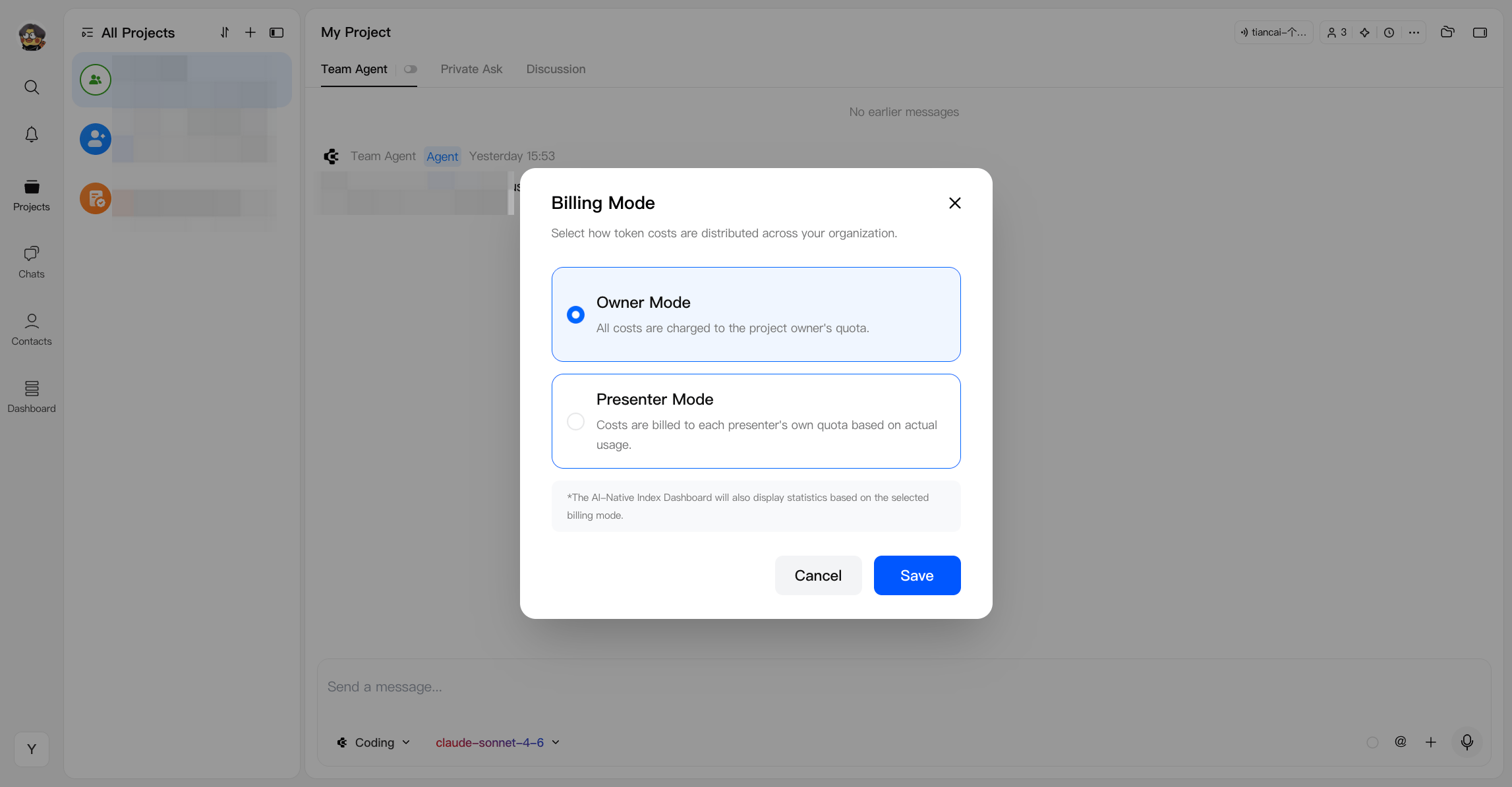
- Owner Mode — Usage is attributed to the project Owner
- Presenter Mode — Usage is attributed to the current presenter based on their actual activity
Model templates
Team Plan admins can create reusable model configurations for different teams or types of work. A model template can define:- Available models
- Model display order
- Default model
- Whether Auto mode is used as the default
- Product and engineering template
- Marketing and operations template
- Cost-controlled template
Model usage limits
Team Plan admins can control which AI models each member is allowed to use. Model template- Go to Usage → Members & Quotas
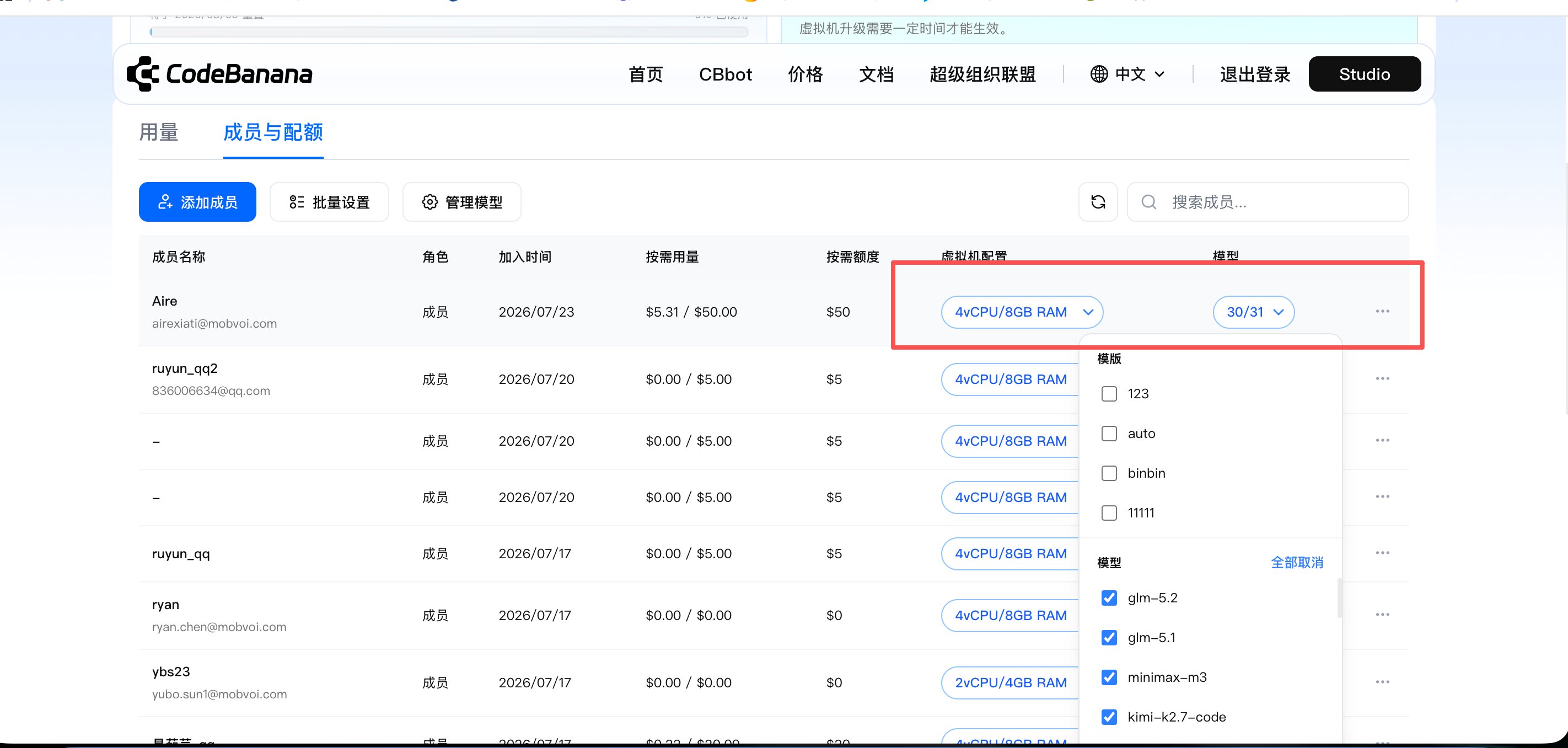
- Find the Models column
- Create a model template
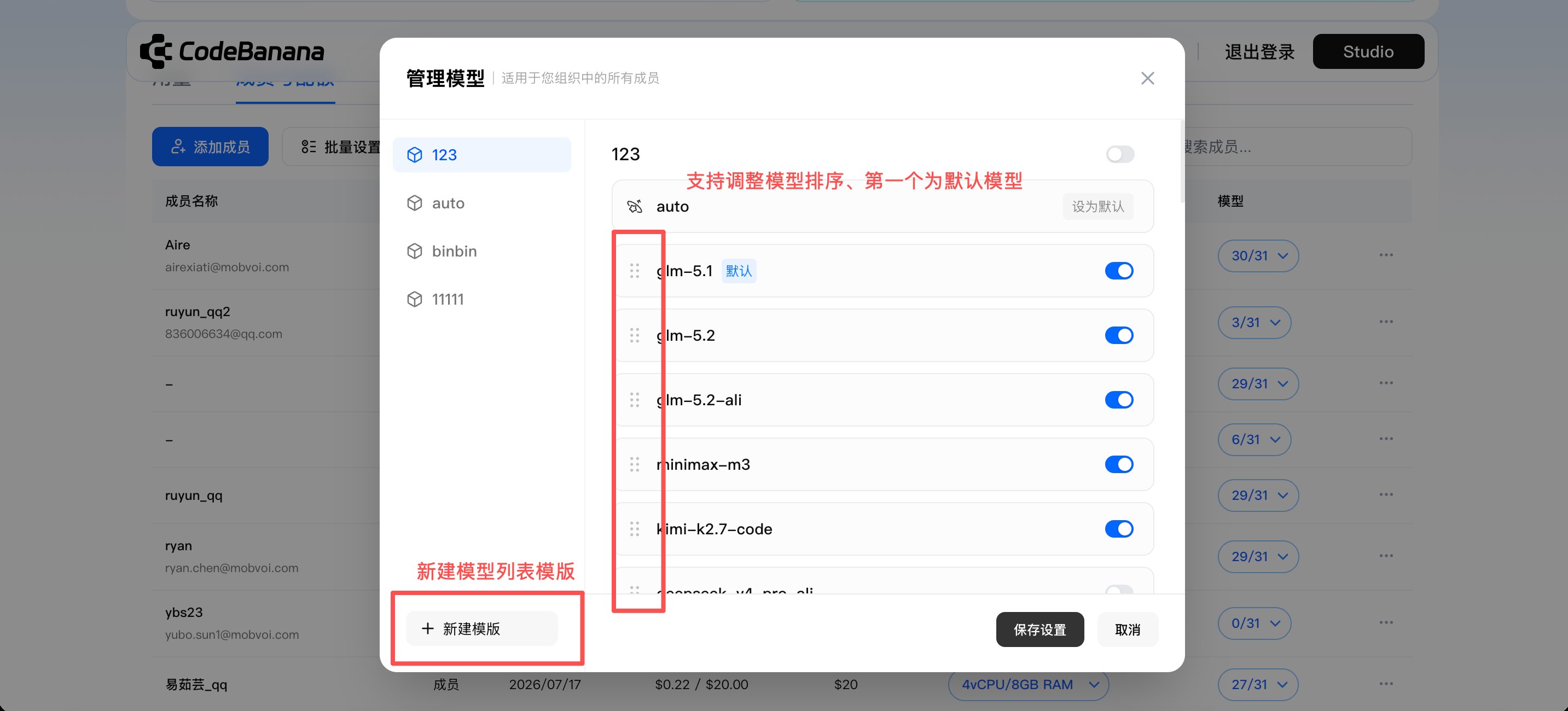
- Per-member model limits
- All — all organization-available models
- Model template — a reusable model configuration created by the admin
- Selected models only — only individually selected models are available
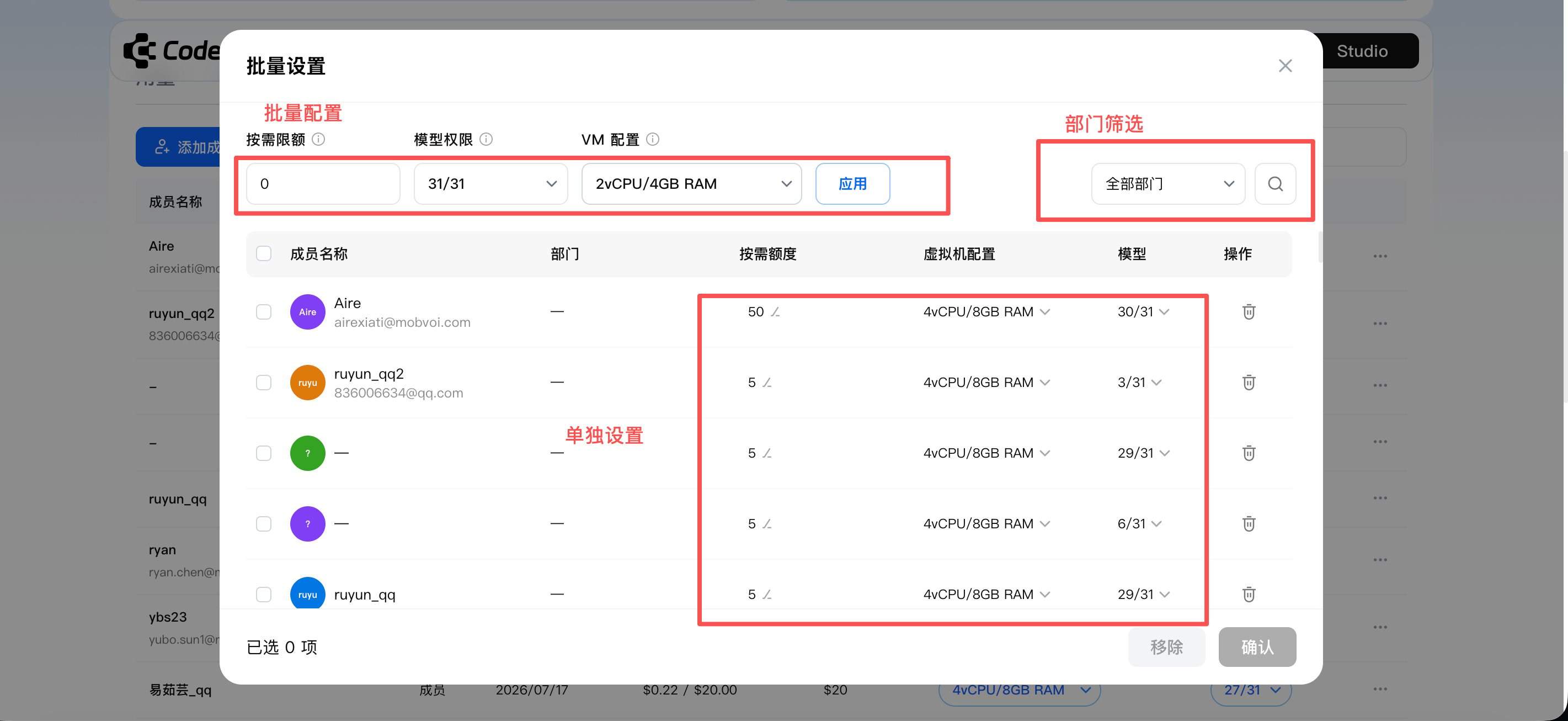
- Batch member management
- Filter members by department based on the organization structure
- Select multiple members or use the top panel to set in bulk
- Apply available models or model templates
- The Model Limits filter helps identify members with restricted model access
- The member table shows the model configuration applied to each member
- Unavailable models appear disabled in project model selectors
- Model restrictions are applied at the member level
- If a restricted member creates a project:
- If the billing mode is Owner Mode: everyone in that project can only use the models allowed under that member’s model configuration
- If the billing mode is Presenter Mode: everyone in that project can use the models allowed under their own model configuration
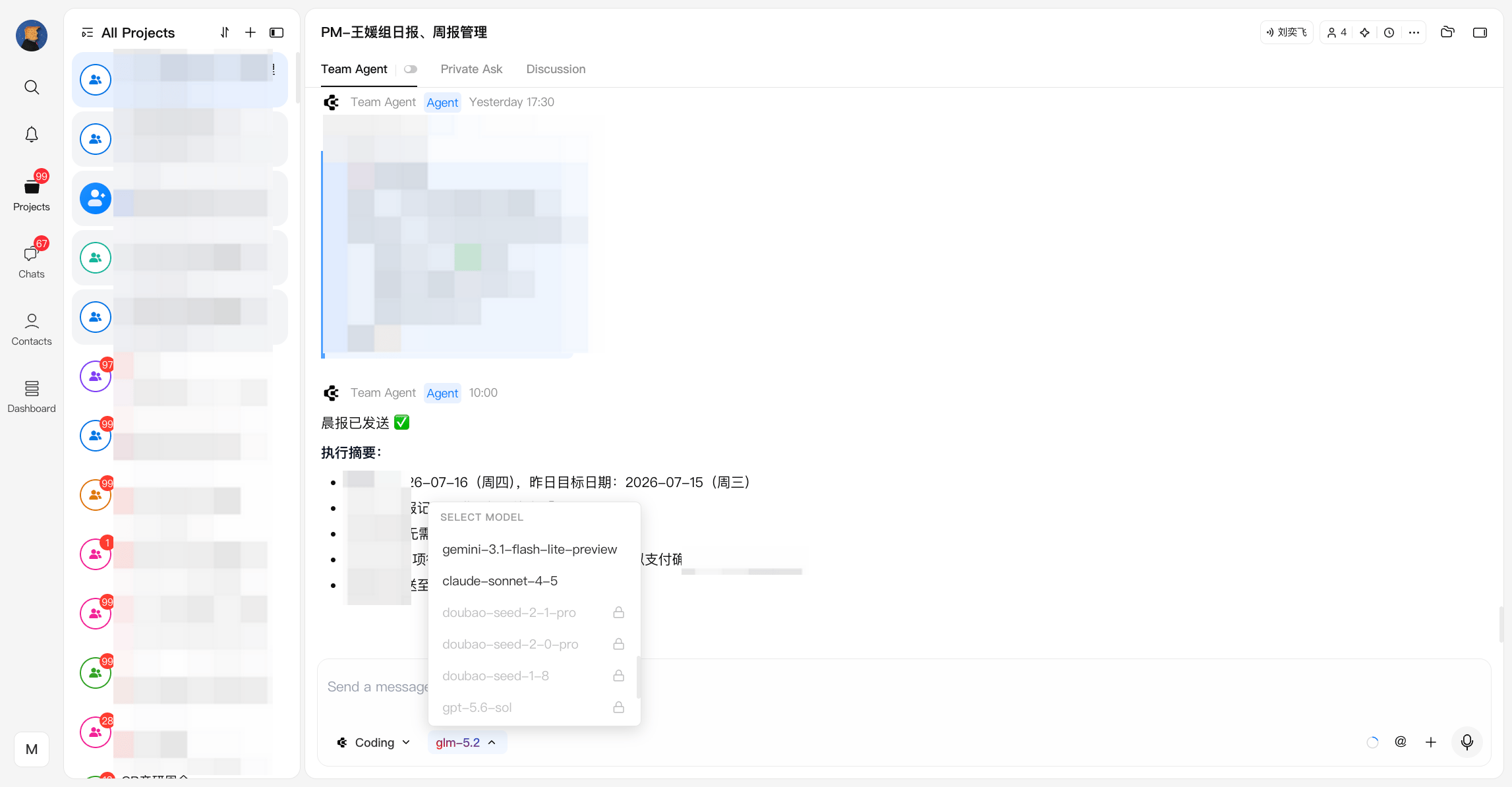
Additional payment when seats are insufficient
If the required VM seat is unavailable, confirming the member configuration redirects the admin to the payment page. Payment can be completed through:- Budget Balance, when the organization has sufficient balance
- Stripe, when additional payment is required
Member on-demand limits
Organization Owners and Admins can configure an independent on-demand limit for each Team Plan member. Admins can:- Set limits while adding members
- Modify limits directly in Members & Quotas
- Configure multiple members in bulk
- Apply different limits to individual members
- Their configured on-demand limit
- The organization’s remaining Budget Balance
Modify member plans
Admins can manage:- On-demand limits
- Model permissions
- VM configurations
- Team Plan membership
- VM upgrades are supported
- Changes take effect after confirmation
- If an additional seat or payment is required, the admin is directed to the payment flow
- Payment can use Budget Balance when sufficient, or Stripe
- VM downgrades are supported
- Each member can downgrade their VM configuration only once during an entitlement period
- Admins can remove members from Team Plan
- The released seat becomes available for reassignment
- Removing a member does not automatically reduce the number of purchased seats
Billing management
Invoices are available from Personal Center → Billing.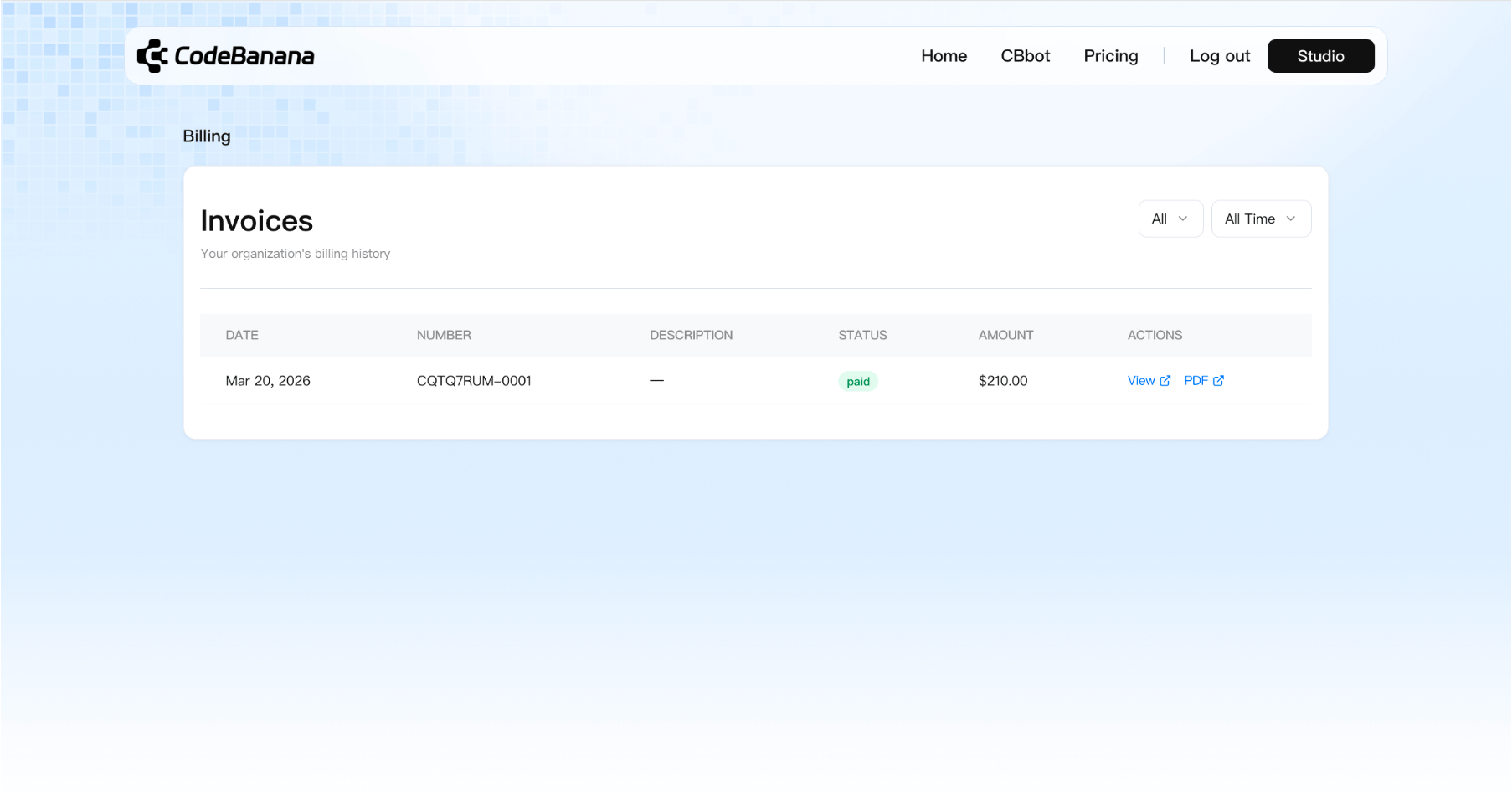
Budget Balance
Budget Balance is the organization’s shared balance for Team Plan usage and management. It replaces the previous Token Balance name because the balance can now be used for more than AI token consumption. Budget Balance can be used for:- Organization-wide AI usage
- Team Plan renewal
- Purchasing additional seats
- Upgrading member VM configurations
Top up Budget Balance
Organization Owners and Admins can top up Budget Balance from the Usage page. Available preset amounts include:- $100
- $500
- $1,000
- $2,000
- Current balance
- Top-up amount
- Balance after top-up
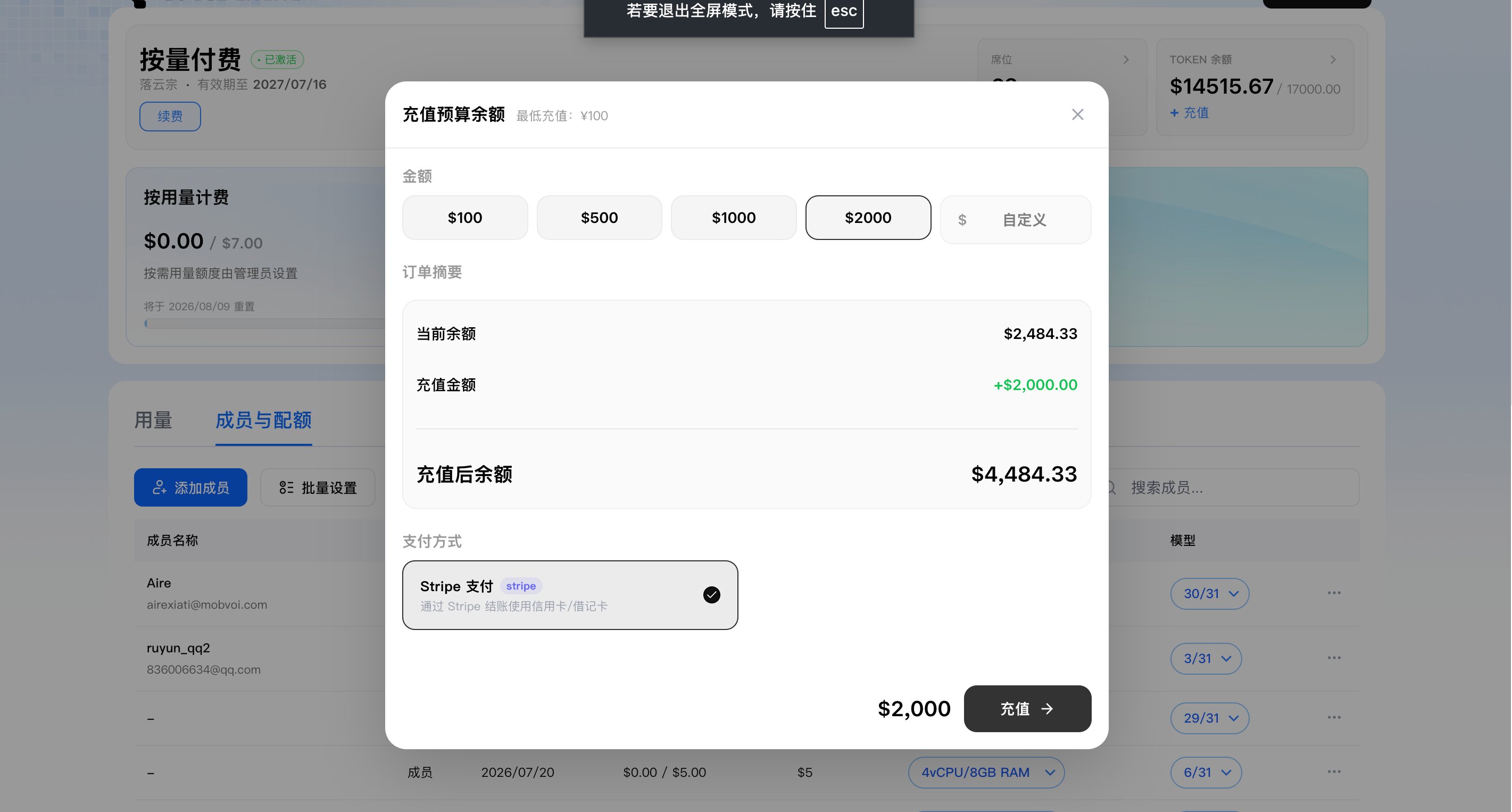
Add Seats
Organization Owners and Admins can purchase additional seats at any time from the Usage page. Additional seats can use different VM configurations, including:- 2 vCPU / 4 GB RAM
- 4 vCPU / 8 GB RAM
- 8 vCPU / 16 GB RAM
- Budget Balance, when sufficient
- Stripe
Renewal
Team Plan can be renewed from the Usage page by clicking Renew. During renewal, admins can:- Select a validity period of 1, 3, 6, or 12 months
- Increase seats
- Reduce seats
- Configure seat quantities for different VM tiers
- Pay with Budget Balance when sufficient
- Continue through Stripe when needed
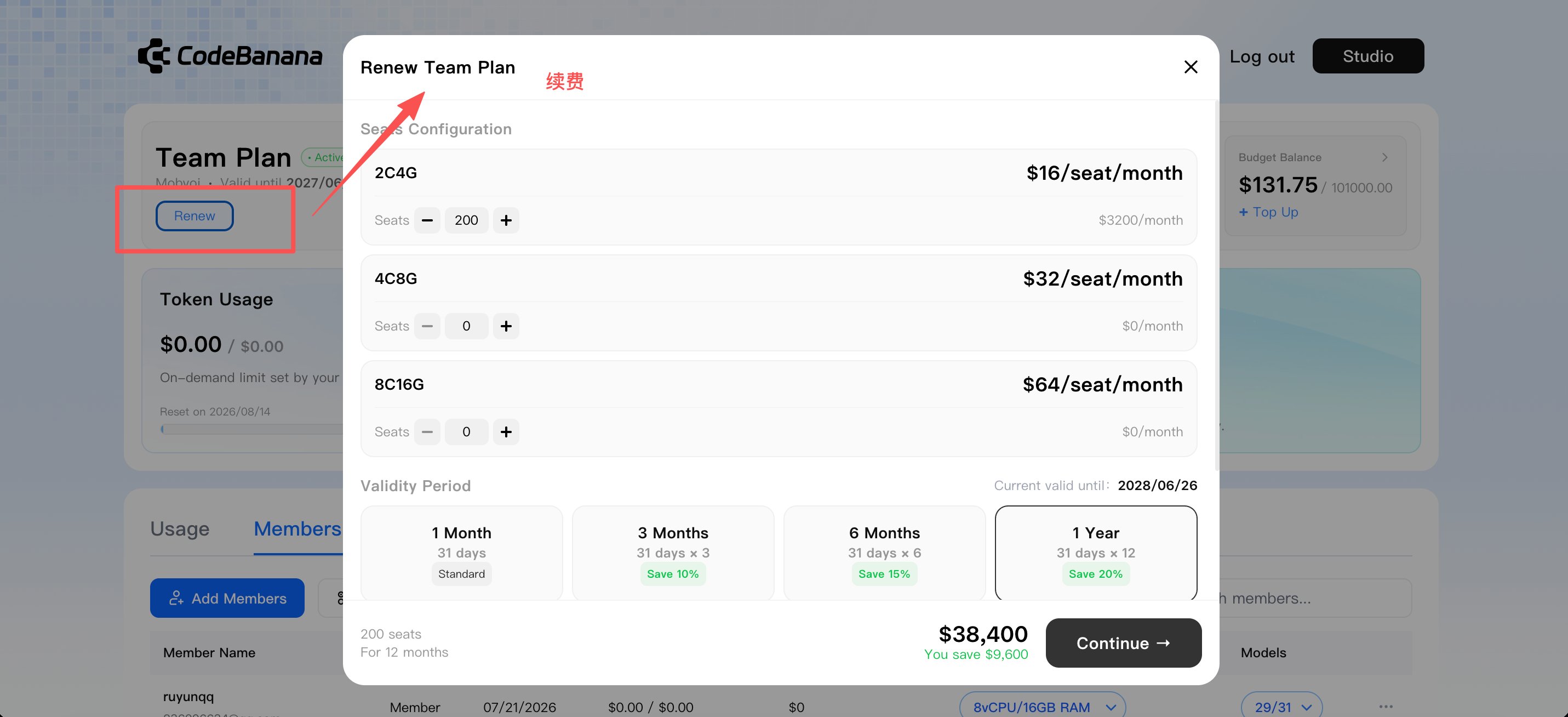
Seat and Budget Records
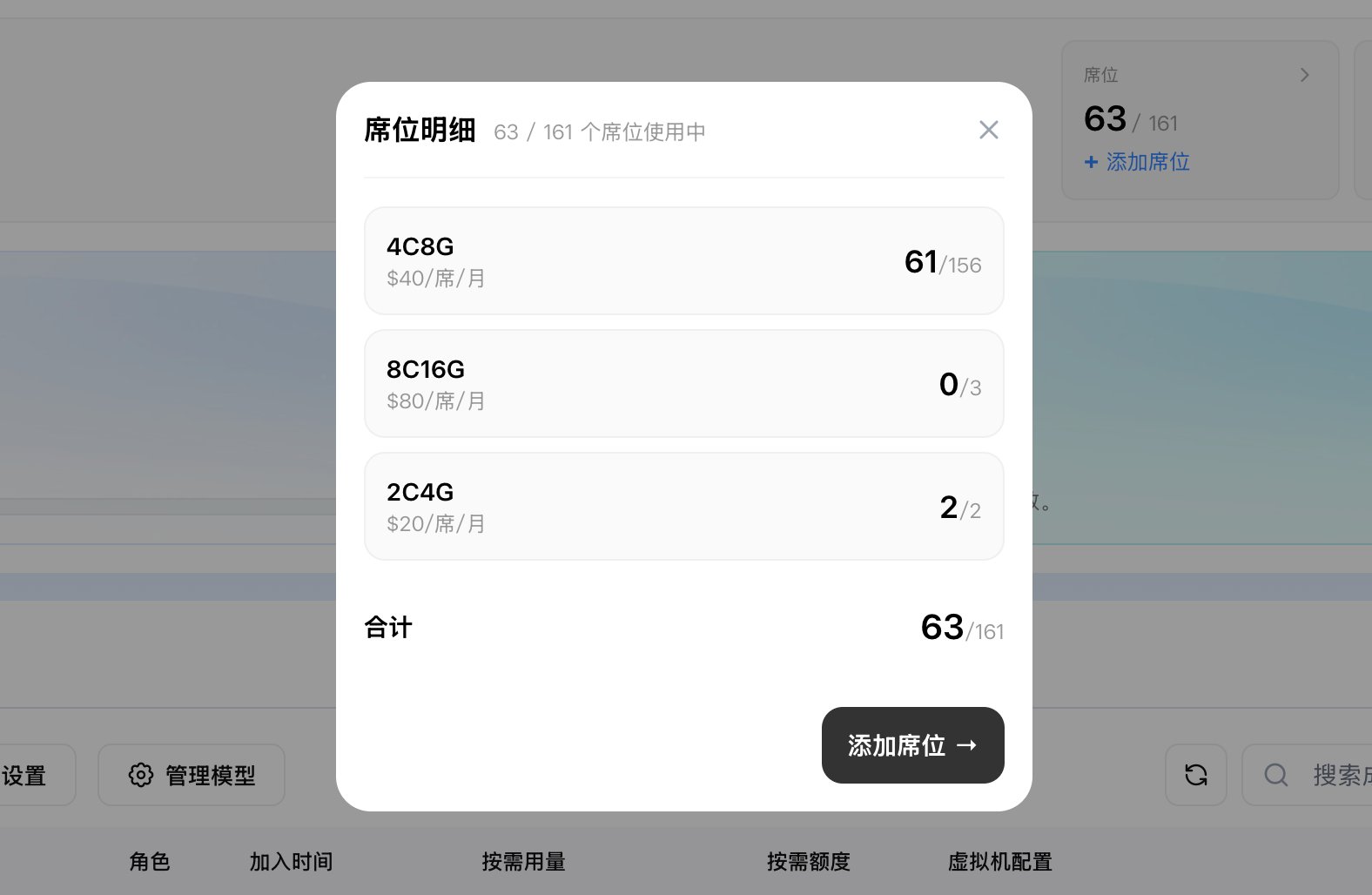
The Usage page provides detailed records for organization seats and Budget Balance.Seat details
Admins can view:- Purchased seats by VM configuration
- Used seats
- Available seats
- Seat changes
Budget history
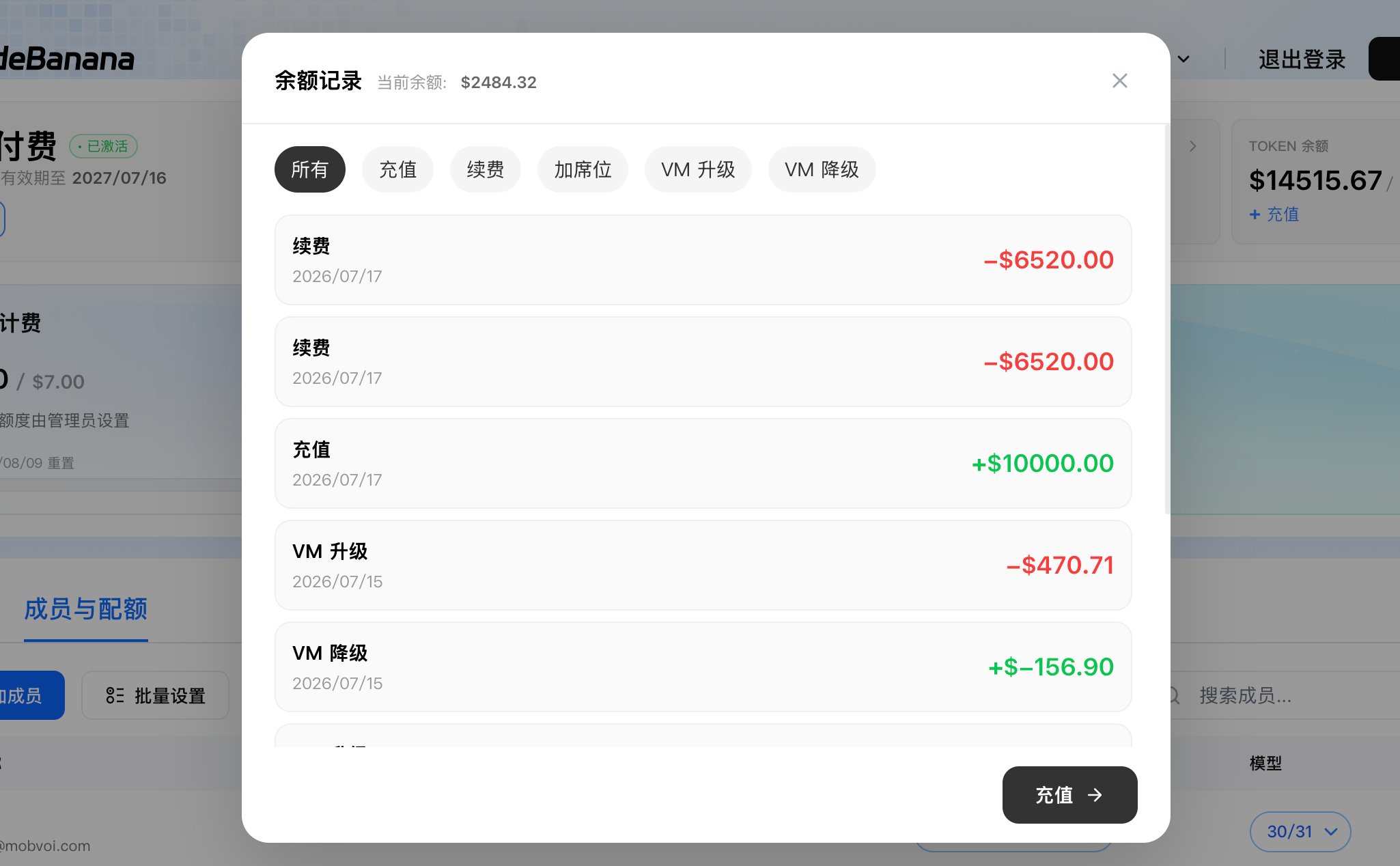
Admins can review Budget Balance transactions and filter them by type, including:- Top-up
- Team Plan renewal
- Additional seat purchase
- VM upgrade
- VM downgrade
- Refund or balance return
Transition Note
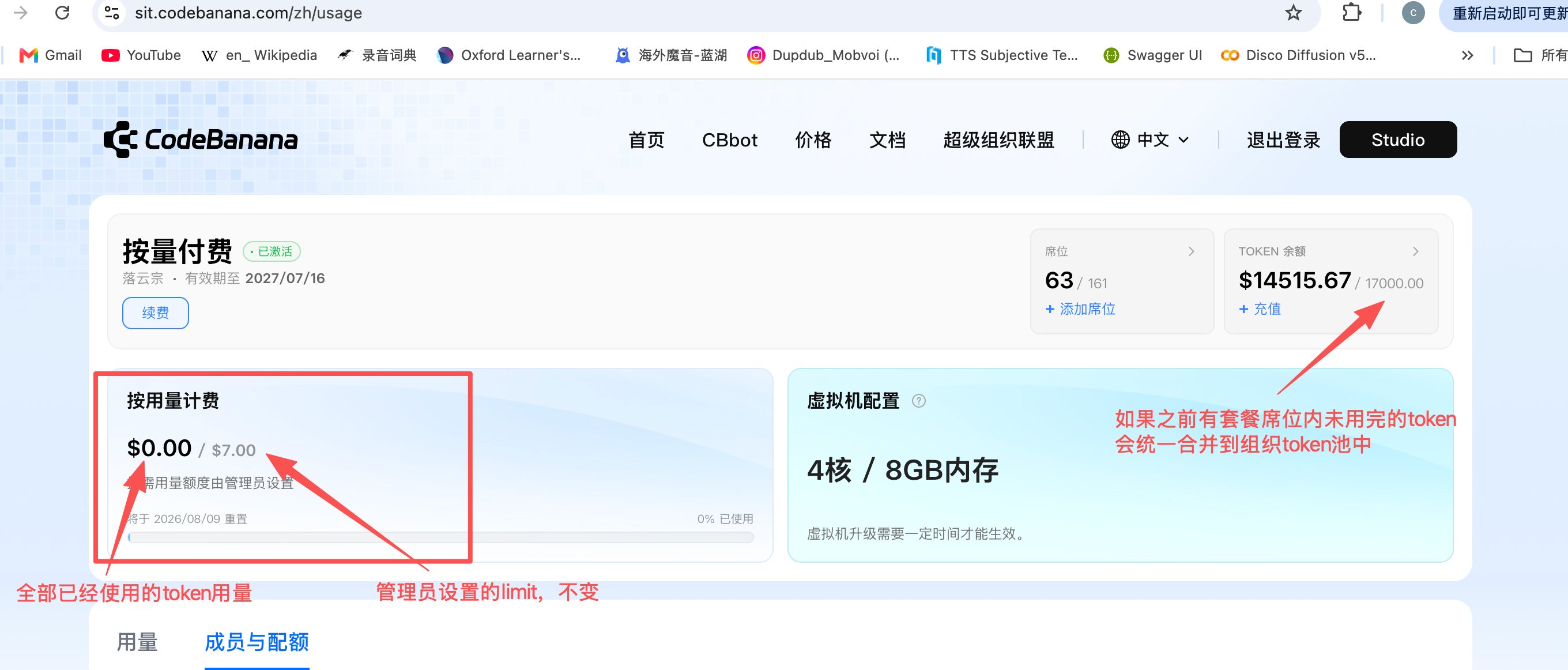
The updated Team Plan changes how existing Team Plan token benefits are managed. For existing Team Plan customers:- Used Token in Plan and used Token Limit amounts are combined in the usage display
- Existing configured member Token Limits remain unchanged
- Unused Token in Plan balance is transferred to the organization’s Budget Balance
- The transferred balance becomes available to all Team Plan members
- The balance can also be used for renewal, additional seats, and VM upgrades
FAQs
Answers to common questions about Team Plan.Where can I purchase Team Plan?
Where can I purchase Team Plan?
Does each Team Plan seat include a separate token quota?
Does each Team Plan seat include a separate token quota?
What is the minimum Budget Balance top-up?
What is the minimum Budget Balance top-up?
Does Budget Balance expire?
Does Budget Balance expire?
What can Budget Balance be used for?
What can Budget Balance be used for?
What validity periods are available for Team Plan?
What validity periods are available for Team Plan?
Can different VM configurations be assigned to different members?
Can different VM configurations be assigned to different members?
Can admins add seats with different VM configurations?
Can admins add seats with different VM configurations?
What happens if I add a seat during an active Team Plan period?
What happens if I add a seat during an active Team Plan period?
Can admins manage multiple members at once?
Can admins manage multiple members at once?
Can individual members be configured separately?
Can individual members be configured separately?
Can VM configurations be downgraded?
Can VM configurations be downgraded?
Can I reduce seats immediately?
Can I reduce seats immediately?
Can I use Budget Balance to renew Team Plan or purchase seats?
Can I use Budget Balance to renew Team Plan or purchase seats?
Can admins filter members by department?
Can admins filter members by department?
Can admins create reusable model configurations?
Can admins create reusable model configurations?
Can admins restrict which AI models members can use?
Can admins restrict which AI models members can use?
How do member model restrictions affect projects?
How do member model restrictions affect projects?
- If the billing mode is Owner Mode: everyone in that project can only use the models allowed under that member’s model configuration
- If the billing mode is Presenter Mode: everyone in that project can use the models allowed under their own model configuration
When will Team Plan show usage warnings?
When will Team Plan show usage warnings?
- A member receives a reminder when their remaining on-demand limit is 10% or less and no more than $10
- The organization Owner or Admin receives a reminder when the remaining Budget Balance falls below 10%
How often can a member receive an on-demand limit reminder?
How often can a member receive an on-demand limit reminder?
Where can admins review seat and Budget Balance changes?
Where can admins review seat and Budget Balance changes?
What happens to unused benefits from the previous Team Plan?
What happens to unused benefits from the previous Team Plan?