> ## Documentation Index
> Fetch the complete documentation index at: https://docs.codebanana.com/llms.txt
> Use this file to discover all available pages before exploring further.
# 团队套餐
> 面向需要共享资源、统一计费以及对多成员进行受控访问的组织而设计。
## **什么是团队套餐**
团队套餐提供一种 **协作式使用模式**,其特点包括:
* 资源(requests、算力、usage limits)在 **组织层级** 统一管理
* 账单由 **组织 Owner** 统一支付
### **套餐结构**
团队套餐由两个主要部分组成:
**预付费(包含用量)**
* 每位成员每月可获得 **300 次 requests**
* 可根据使用需求选择 VM 配置,由 **组织管理员** 统一控制
* 费用会根据所选 VM 档位而变化(以席位费形式收取)
**后付费**
* 当包含的 requests 用尽后启用
* 额外用量将按实际消耗计费
* Usage limits 由 **组织管理员** 进行定义和控制
## **升级到团队套餐**
***管理员操作***
登录后,管理员进入 **Pricing / Subscription** 页面,并找到 **团队套餐**。
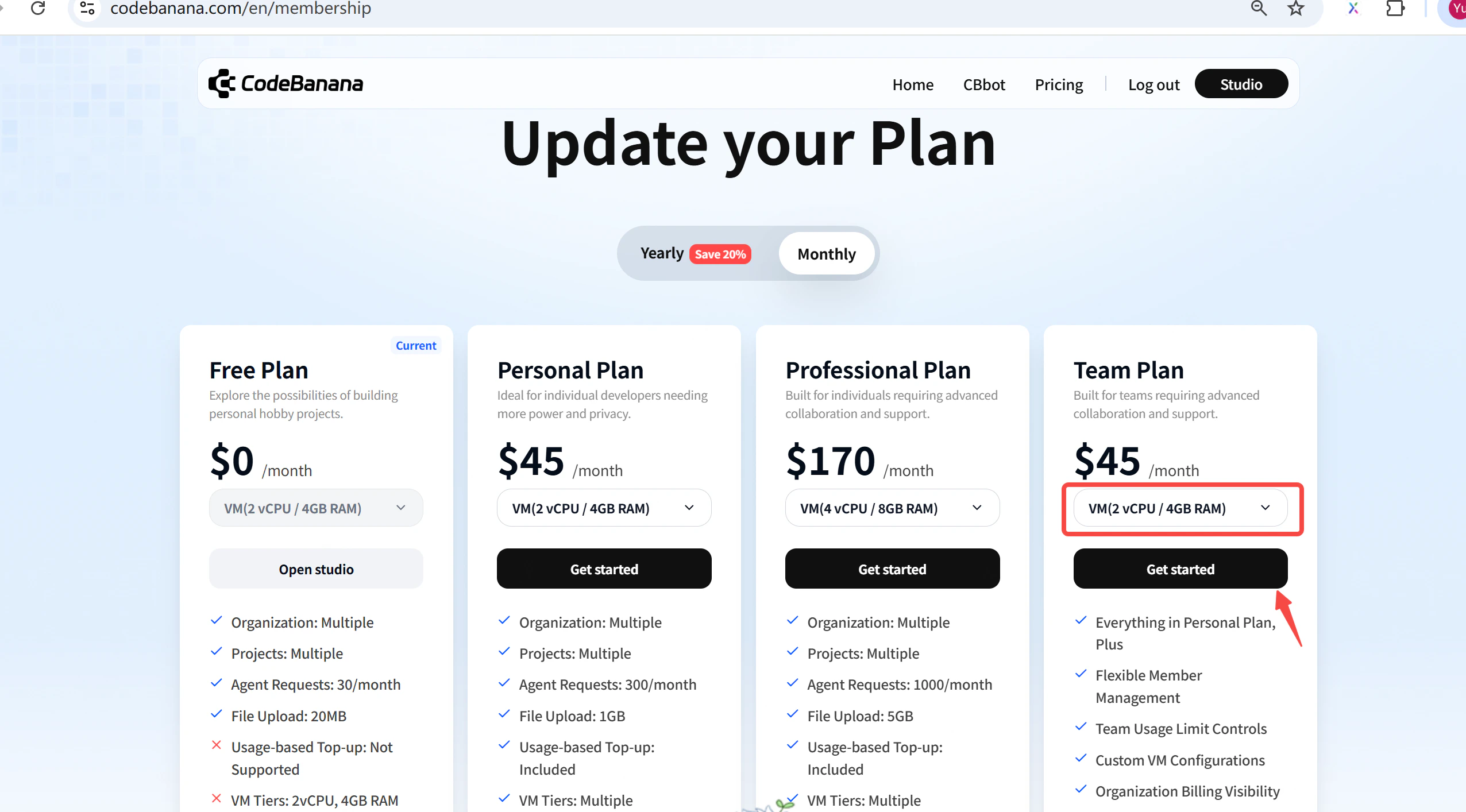 点击 **Subscribe** 按钮完成支付流程。
* 激活后,系统会立即收取首个席位费用(即管理员自己的席位)。
点击 **Subscribe** 按钮完成支付流程。
* 激活后,系统会立即收取首个席位费用(即管理员自己的席位)。
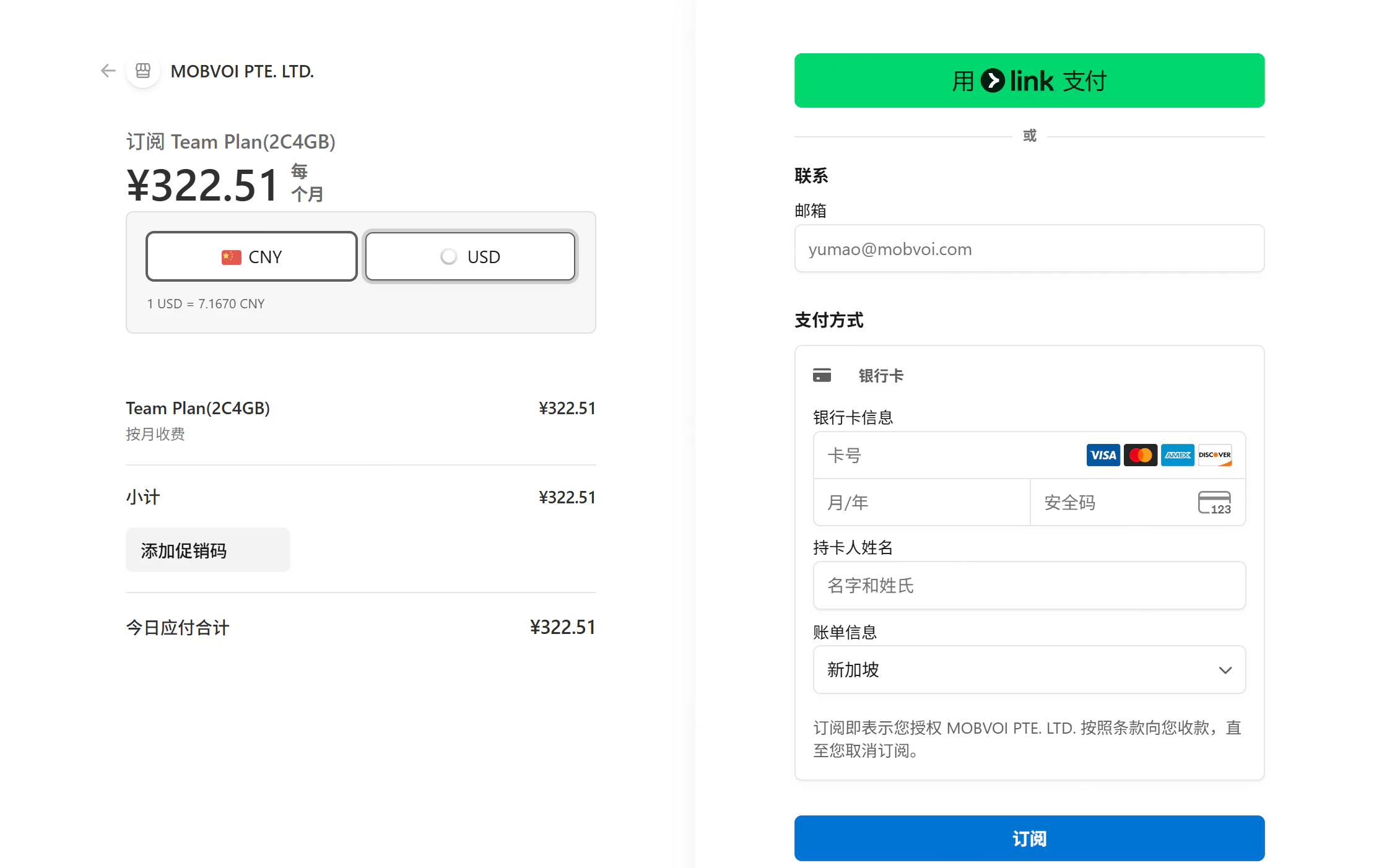 默认情况下,激活团队套餐时会先收取一个席位的费用(管理员本人)。后续新增席位将根据实际添加的成员数量进行计费。请确保已绑定有效信用卡,且卡内余额充足。
## **管理员控制**
组织 Owner 负责管理团队套餐的配置与计费:
#### **将成员添加到团队套餐**
点击右上角头像
在下拉菜单中选择 “Usage”,进入用量管理页面
默认情况下,激活团队套餐时会先收取一个席位的费用(管理员本人)。后续新增席位将根据实际添加的成员数量进行计费。请确保已绑定有效信用卡,且卡内余额充足。
## **管理员控制**
组织 Owner 负责管理团队套餐的配置与计费:
#### **将成员添加到团队套餐**
点击右上角头像
在下拉菜单中选择 “Usage”,进入用量管理页面
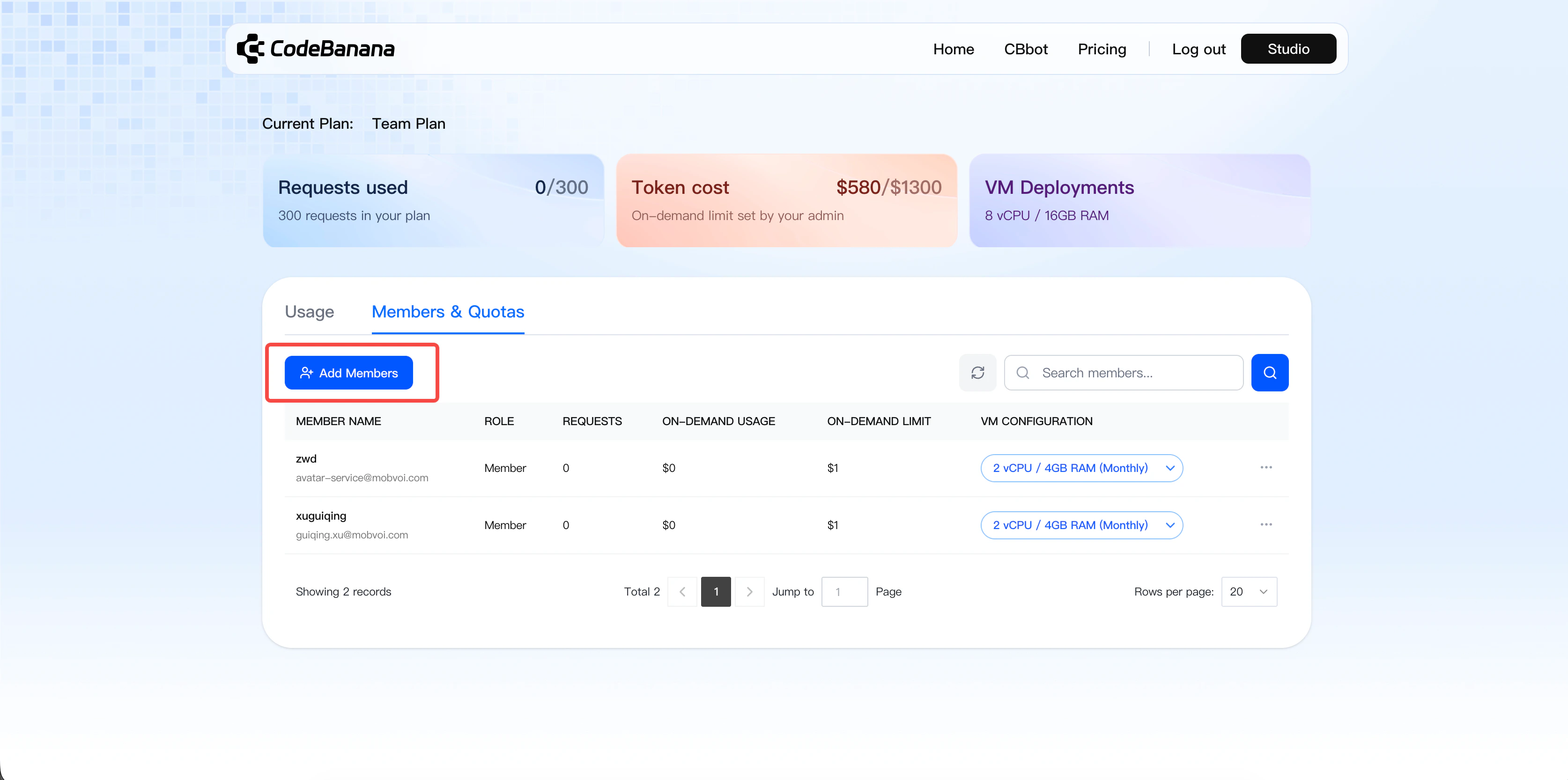
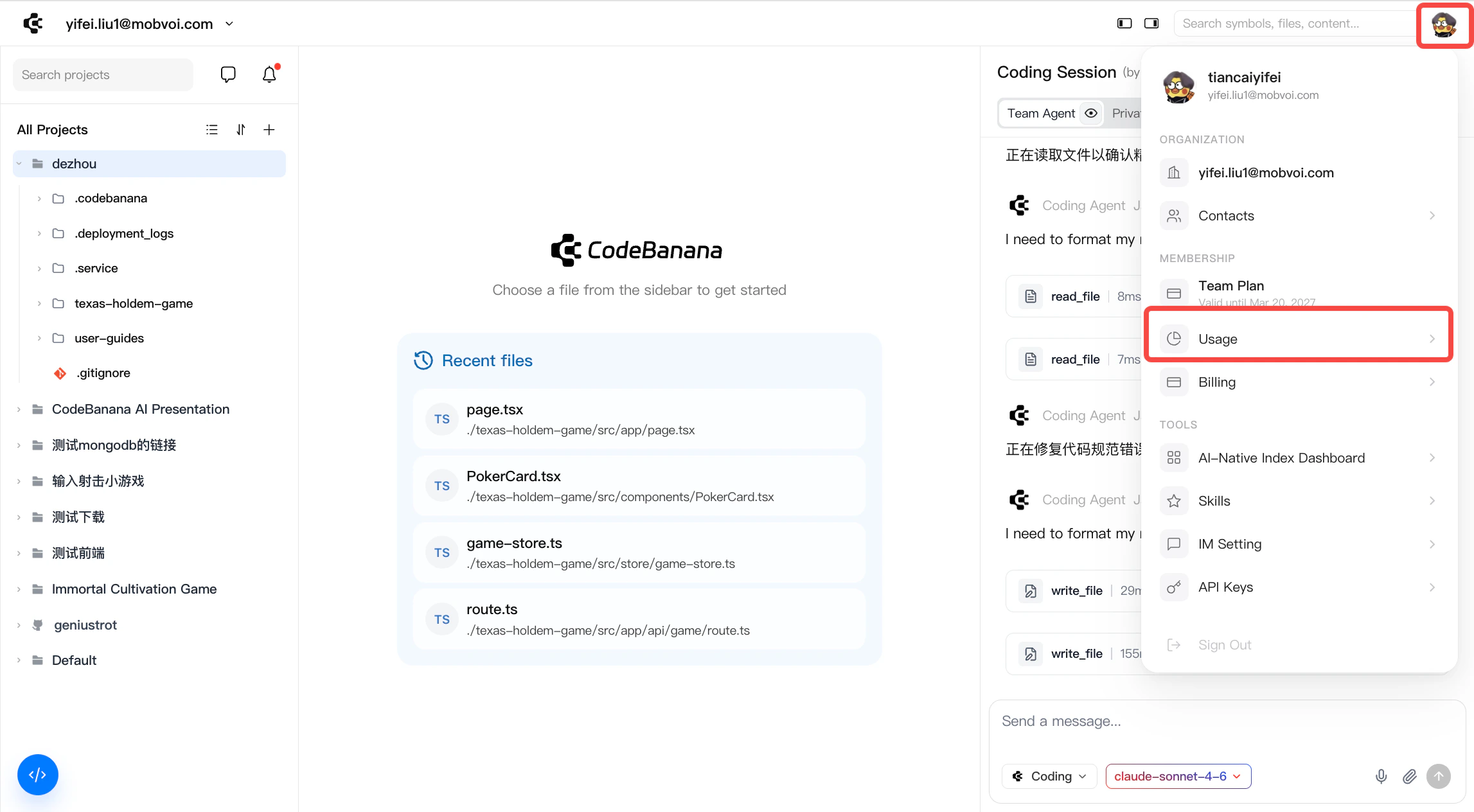 切换到 “Members & Quotas” 标签页。
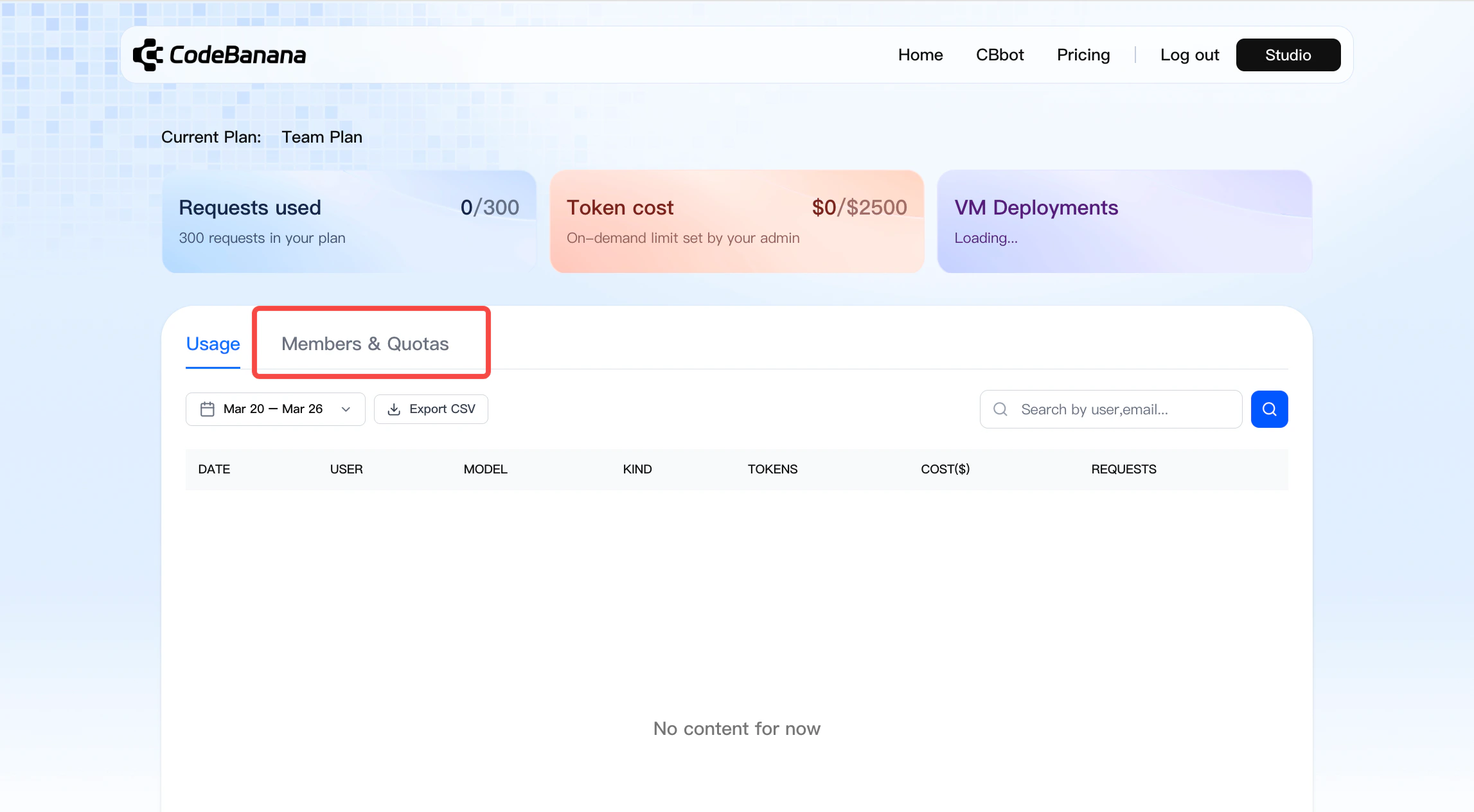 点击蓝色的 “Add Members” 按钮,打开成员选择弹窗
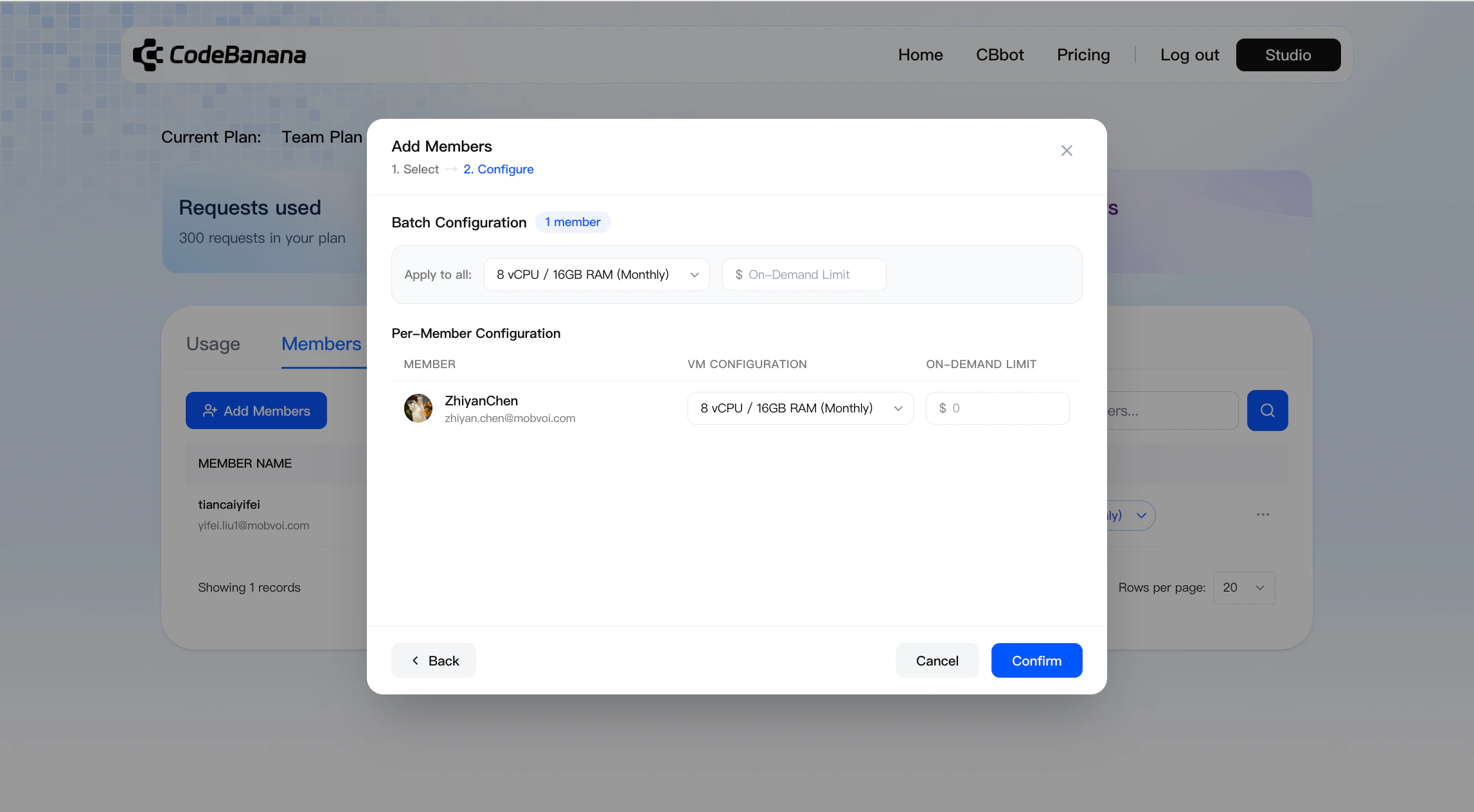 进入配置步骤,为成员分配 VM 规格
支持批量配置,也支持按成员单独自定义
进入配置步骤,为成员分配 VM 规格
支持批量配置,也支持按成员单独自定义
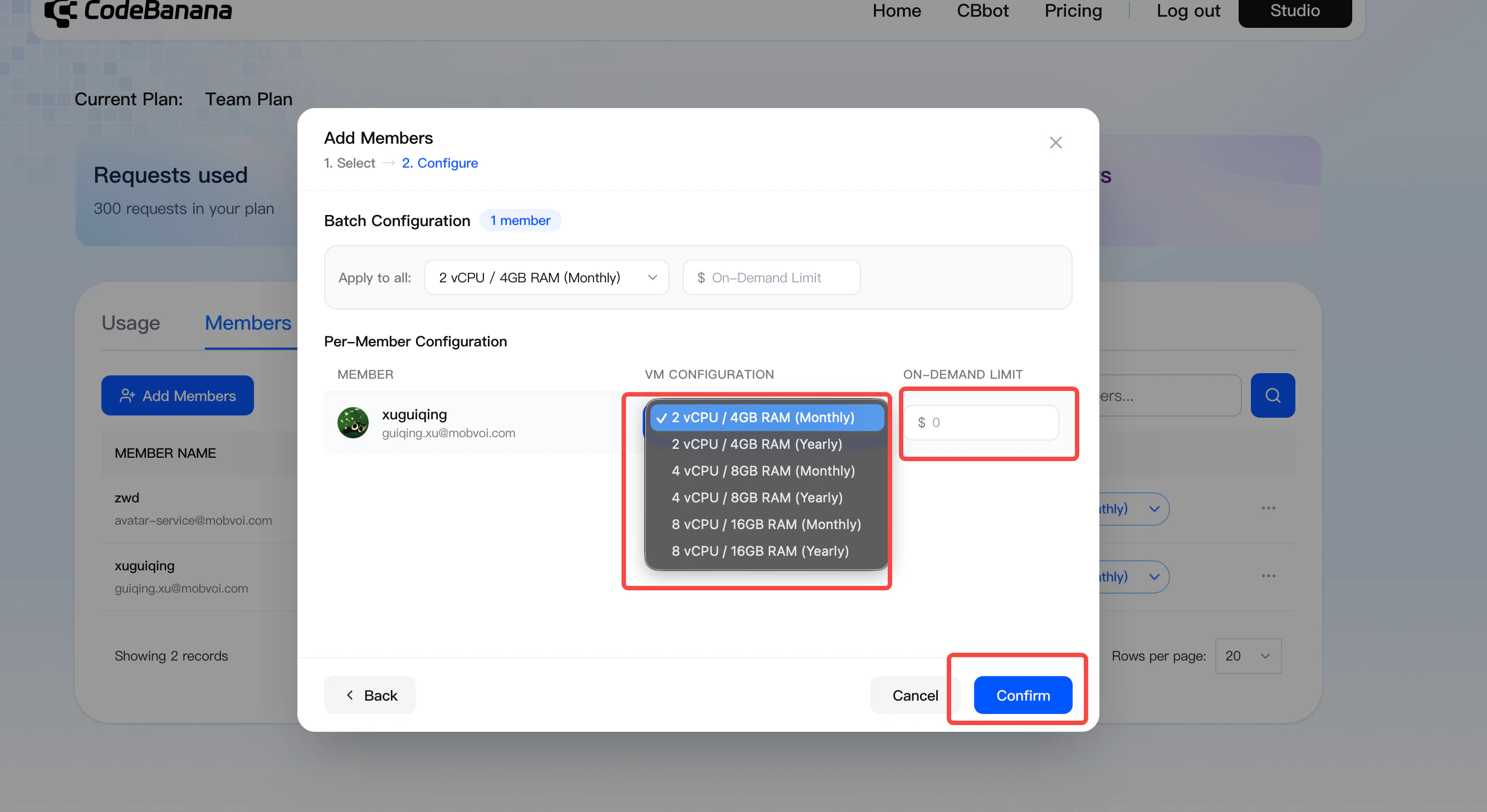 席位费用会根据所选 VM 配置,**立即** 从 **Owner 的支付方式** 中扣除
在将成员添加到团队套餐之前,用户必须先申请加入管理员所在的组织。只有在管理员审批通过后,才能为其分配席位。
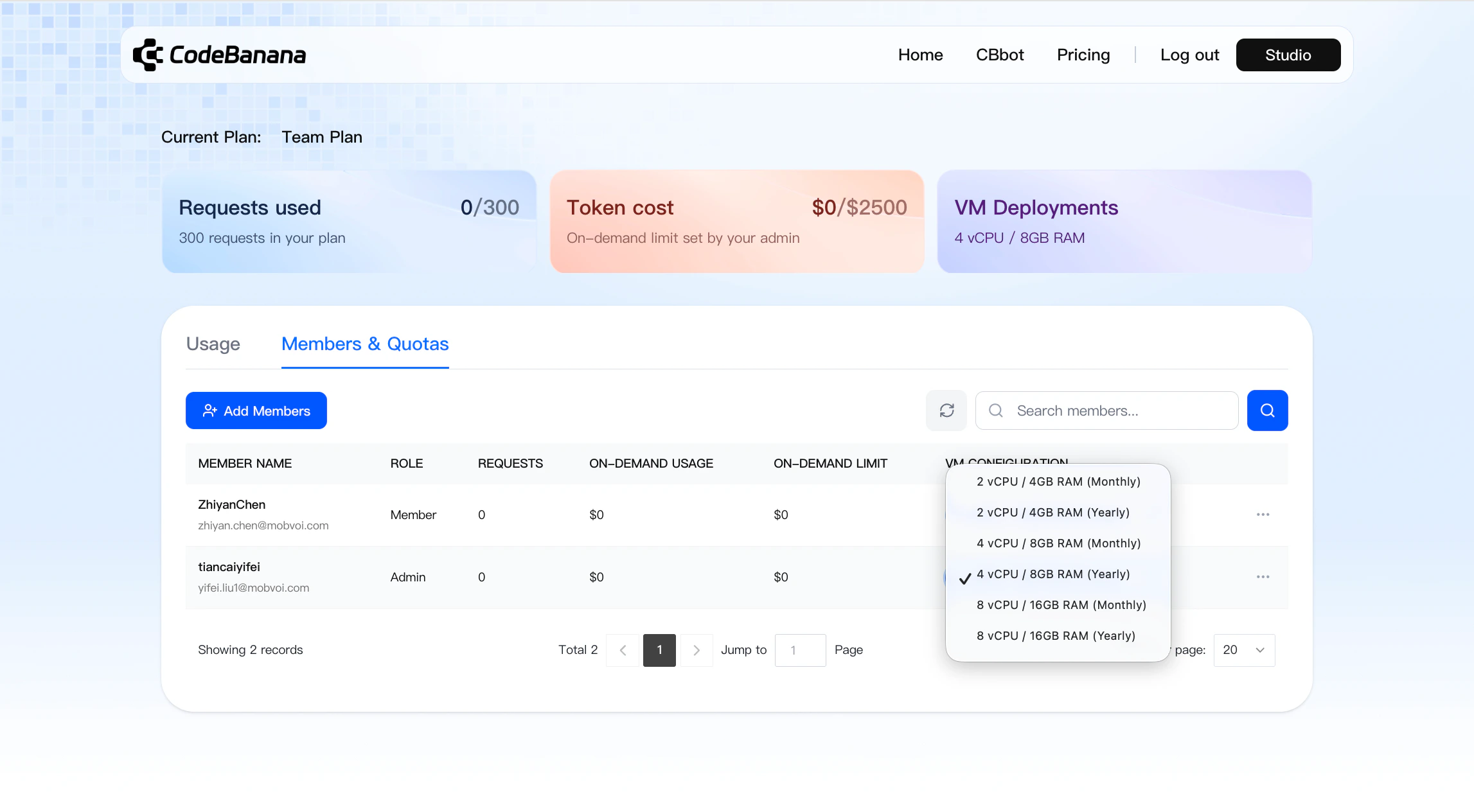
#### **修改成员套餐**
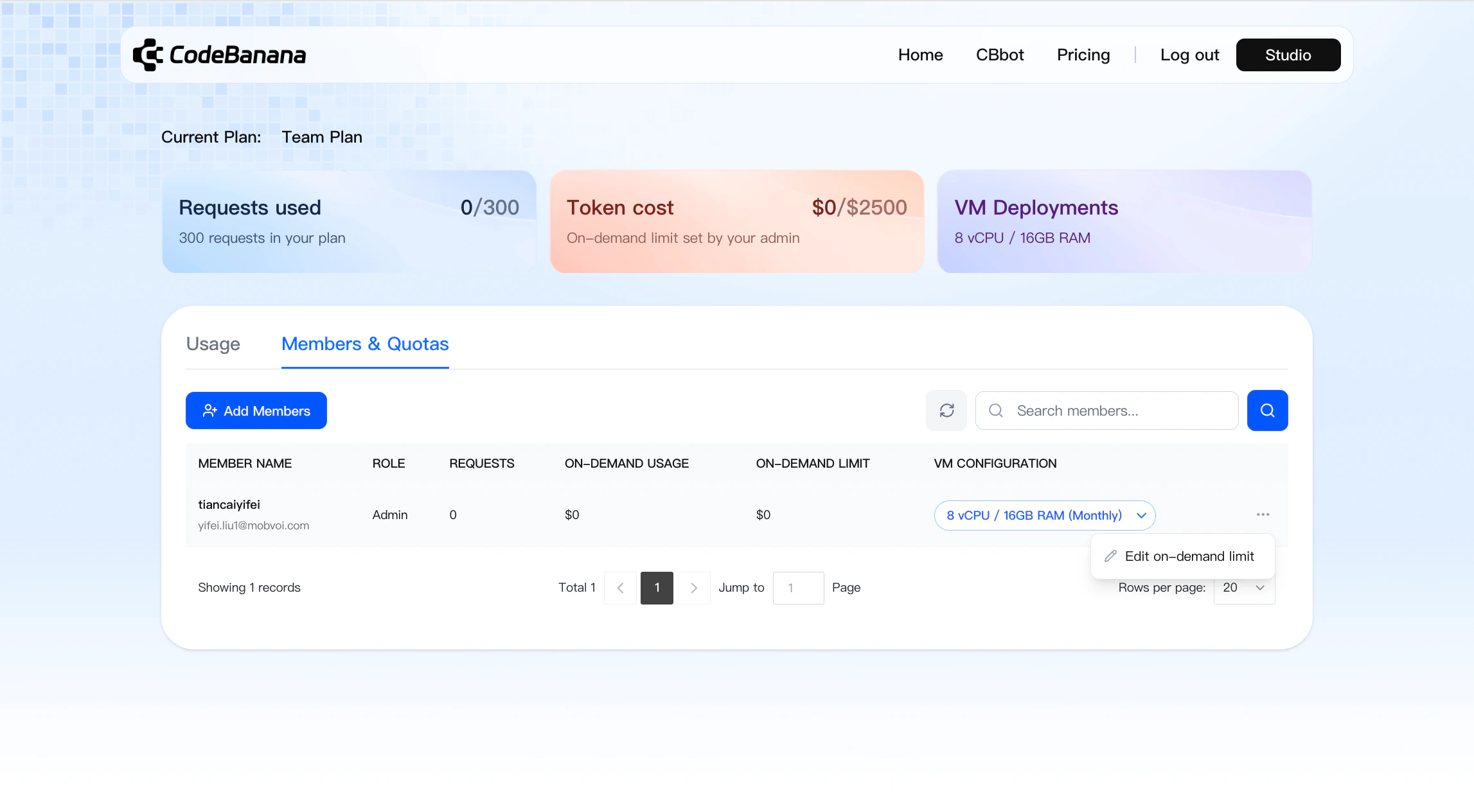
**管理员可以更新:**
* VM 配置
* On-demand usage limits
* 成员只能在已配置的额度内使用资源
* 超出额度后将无法继续使用
席位费用会根据所选 VM 配置,**立即** 从 **Owner 的支付方式** 中扣除
在将成员添加到团队套餐之前,用户必须先申请加入管理员所在的组织。只有在管理员审批通过后,才能为其分配席位。
#### **修改成员套餐**
**管理员可以更新:**
* VM 配置
* On-demand usage limits
* 成员只能在已配置的额度内使用资源
* 超出额度后将无法继续使用
 **升级行为**:
* 立即生效
* 差价将由 Owner 扣费(**仅适用于 VM 变更**)
**降级行为**:
* 剩余余额将保留在 Stripe 中(**仅适用于 VM 变更**),用于抵扣后续账单
* 如需退款,需通过邮件手动申请
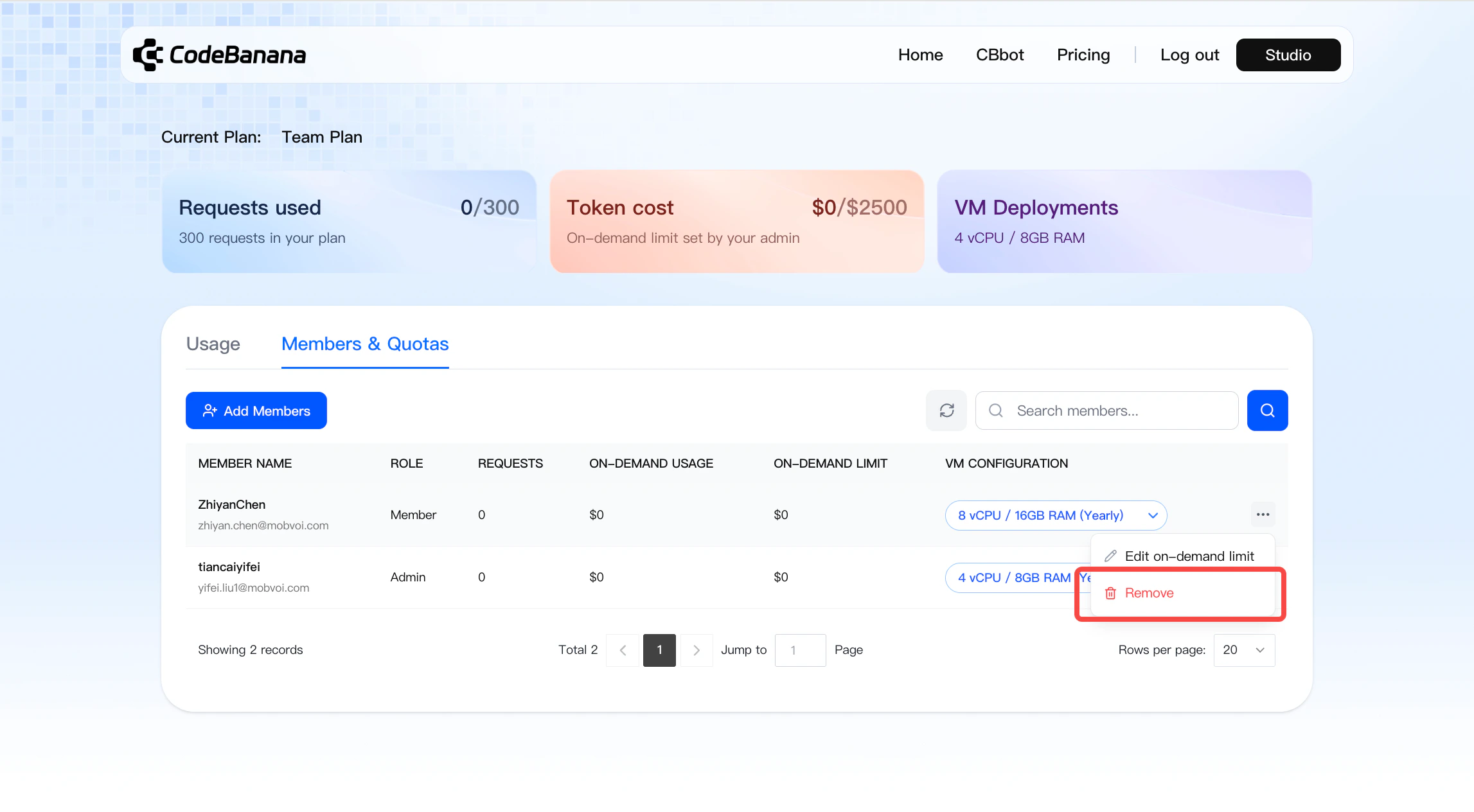
**移除成员**:
* 管理员可以移除团队套餐成员
* 只有在冷却期结束后,才可再次添加该成员
**升级行为**:
* 立即生效
* 差价将由 Owner 扣费(**仅适用于 VM 变更**)
**降级行为**:
* 剩余余额将保留在 Stripe 中(**仅适用于 VM 变更**),用于抵扣后续账单
* 如需退款,需通过邮件手动申请
**移除成员**:
* 管理员可以移除团队套餐成员
* 只有在冷却期结束后,才可再次添加该成员
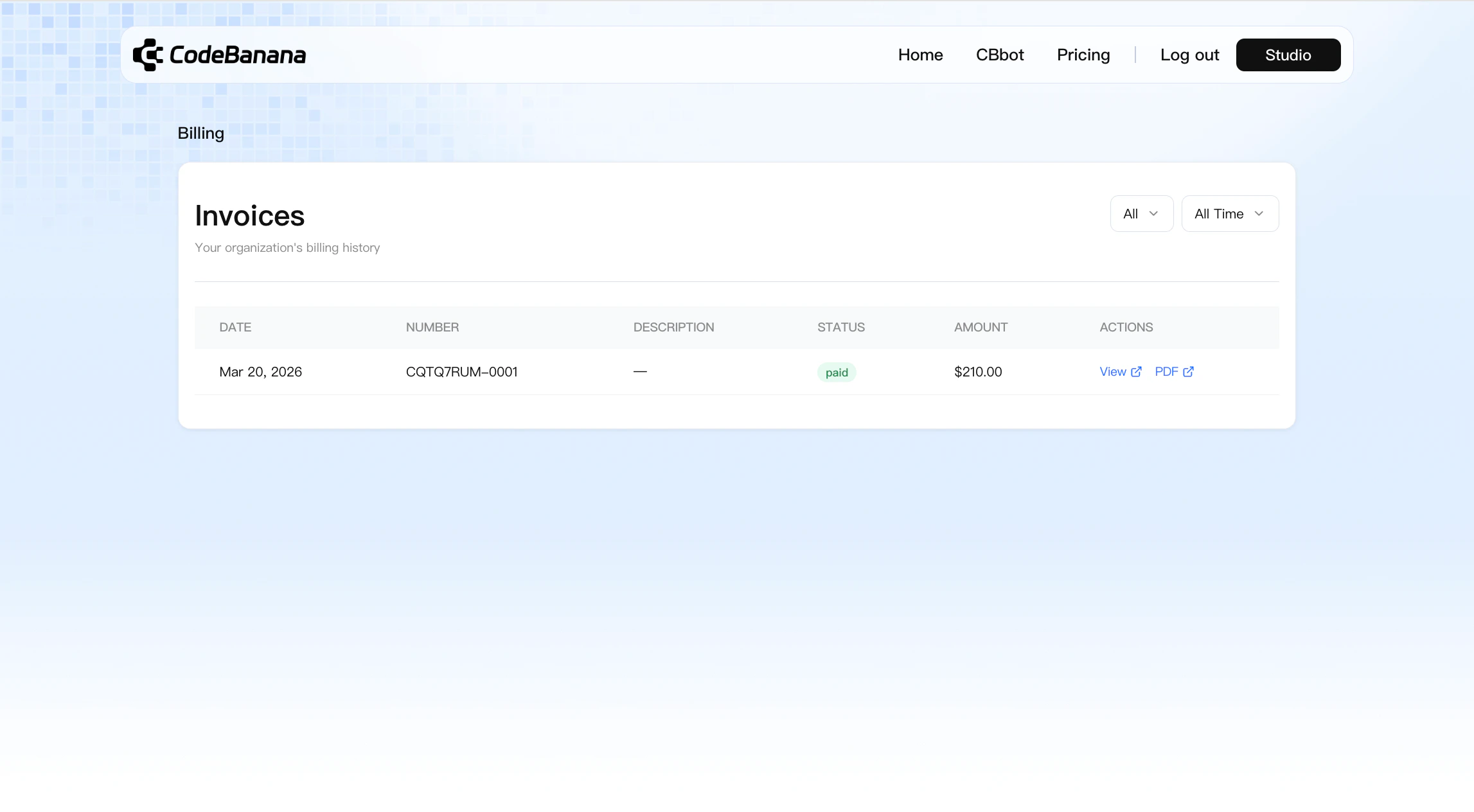
 **账单管理**
* 所有账单均可在 **Personal Center → Billing** 中查看
**账单管理**
* 所有账单均可在 **Personal Center → Billing** 中查看
 #### **升级 / 降级的价格计算逻辑**
使用成本按以下 **两者中的较高值** 计算:
* **(套餐总价 / 总天数)× 已使用天数**,或
* **每次 request \$0.15**
剩余余额计算方式:
* 余额 = 已支付金额 − 已使用金额
* 升级费用 = 新价格 − 剩余余额
#### **成员使用体验**
启用团队套餐后:
成员需要由 **管理员手动添加**
添加成功后,成员将获得:
* 每月 300 次 requests
* 已分配的 VM 资源
* 已配置的 usage limits
当额度用尽时:
* 成员需要联系管理员提升配额
如果成员 **未被添加到团队套餐**:
* 其用量将按 **个人套餐** 进行计费
#### **计费机制**
**席位费**
* 激活团队套餐时,会先收取管理员席位费用
* 添加成员时,会向 Owner 收取对应席位费用
**用量计费**
* 在以下任一条件满足时自动扣费:
* On-demand usage 达到 **\$2000**
* 每满 **30 天**
#### **用量查看**
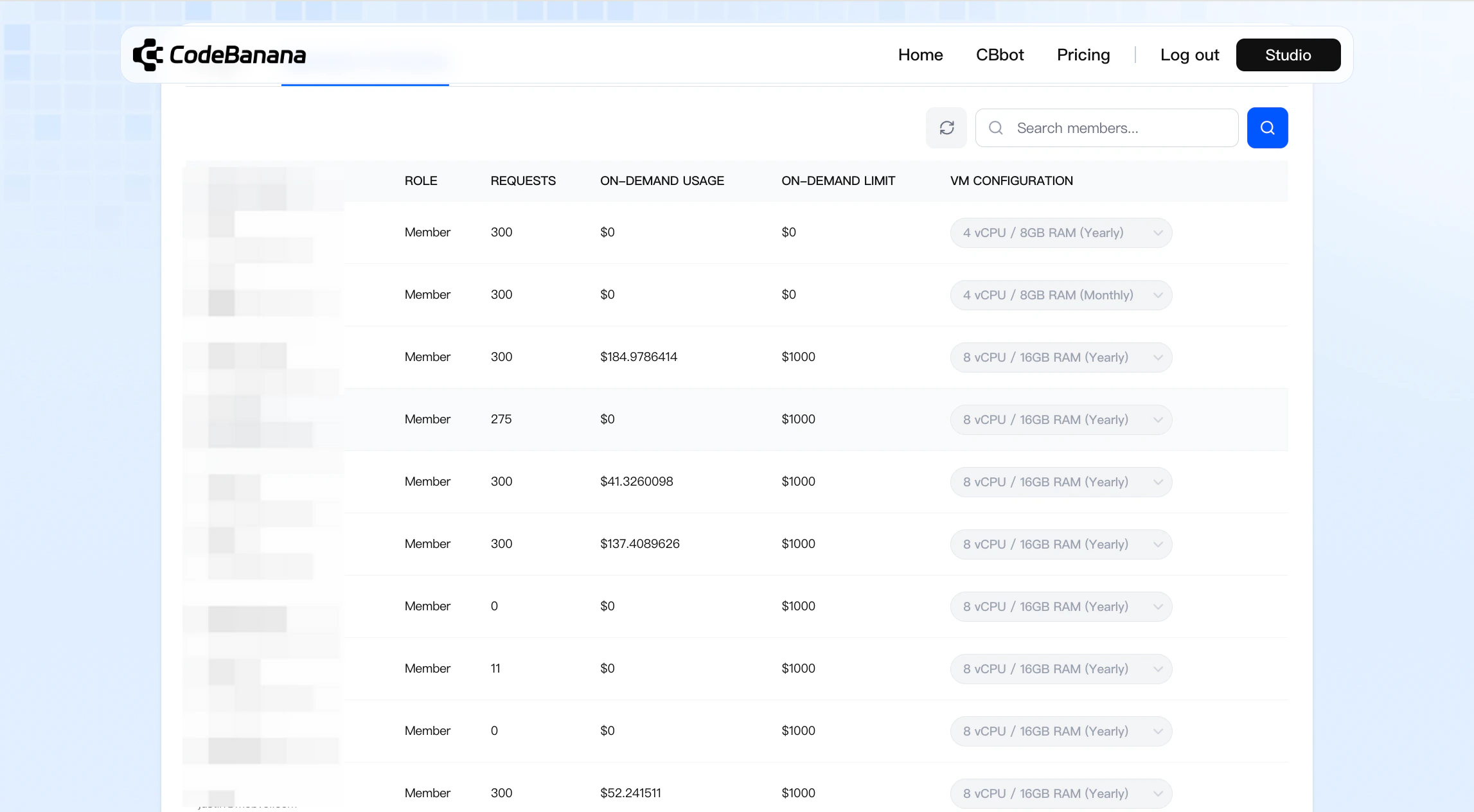
前往 **Personal Center → Usage** 可查看:
* Token 消耗
* Request 使用情况
* 整体配额与限制
#### **升级 / 降级的价格计算逻辑**
使用成本按以下 **两者中的较高值** 计算:
* **(套餐总价 / 总天数)× 已使用天数**,或
* **每次 request \$0.15**
剩余余额计算方式:
* 余额 = 已支付金额 − 已使用金额
* 升级费用 = 新价格 − 剩余余额
#### **成员使用体验**
启用团队套餐后:
成员需要由 **管理员手动添加**
添加成功后,成员将获得:
* 每月 300 次 requests
* 已分配的 VM 资源
* 已配置的 usage limits
当额度用尽时:
* 成员需要联系管理员提升配额
如果成员 **未被添加到团队套餐**:
* 其用量将按 **个人套餐** 进行计费
#### **计费机制**
**席位费**
* 激活团队套餐时,会先收取管理员席位费用
* 添加成员时,会向 Owner 收取对应席位费用
**用量计费**
* 在以下任一条件满足时自动扣费:
* On-demand usage 达到 **\$2000**
* 每满 **30 天**
#### **用量查看**
前往 **Personal Center → Usage** 可查看:
* Token 消耗
* Request 使用情况
* 整体配额与限制
 ## FAQs
团队套餐常见问题解答
该成员尚未完成加入组织的申请。请让其登录 CodeBanana,前往 “Personal Center → Organization”,搜索您的组织名称并提交申请。待审批通过后,该成员才会出现在可添加列表中。
可以。在 Add Members 步骤中,“Per-Member Configuration” 区域支持为每位成员单独设置 VM 规格和 usage limits。
当 On-Demand limit 超出后,该成员将无法继续使用按量资源,直到管理员提升其额度。
其采用自团队套餐激活之日起开始计算的滚动 30 天周期,而非固定自然月日期。如果总用量先达到 \$2,000,则会提前触发扣费。
管理员可以在 Usage 页面查看全部账单历史以及各成员的详细用量信息。系统也会将账单通知发送至管理员的注册邮箱。
## FAQs
团队套餐常见问题解答
该成员尚未完成加入组织的申请。请让其登录 CodeBanana,前往 “Personal Center → Organization”,搜索您的组织名称并提交申请。待审批通过后,该成员才会出现在可添加列表中。
可以。在 Add Members 步骤中,“Per-Member Configuration” 区域支持为每位成员单独设置 VM 规格和 usage limits。
当 On-Demand limit 超出后,该成员将无法继续使用按量资源,直到管理员提升其额度。
其采用自团队套餐激活之日起开始计算的滚动 30 天周期,而非固定自然月日期。如果总用量先达到 \$2,000,则会提前触发扣费。
管理员可以在 Usage 页面查看全部账单历史以及各成员的详细用量信息。系统也会将账单通知发送至管理员的注册邮箱。