> ## Documentation Index
> Fetch the complete documentation index at: https://docs.codebanana.com/llms.txt
> Use this file to discover all available pages before exploring further.
# Team Plan
> Configure CodeBanana Team Plan for organizations with customizable seats, shared token pool billing, seat-based VM configurations, flexible validity periods, usage alerts, member limits, model usage limits, renewals, enterprise payment support, and visibility into tokens, limits, and expiration timelines.
## **What is Team Plan**
Team Plan is a flexible team subscription for organizations in CodeBanana.
It allows teams to configure and manage:
* Customizable seat counts
* Per-seat VM configurations
* A shared token pool for team-wide usage
All billing and usage management are handled at the organization level, giving admins centralized control over seats, compute, token consumption, and member limits.
***
## **Get Team Plan**
Team Plan can be purchased from **Pricing → Team Plan**.
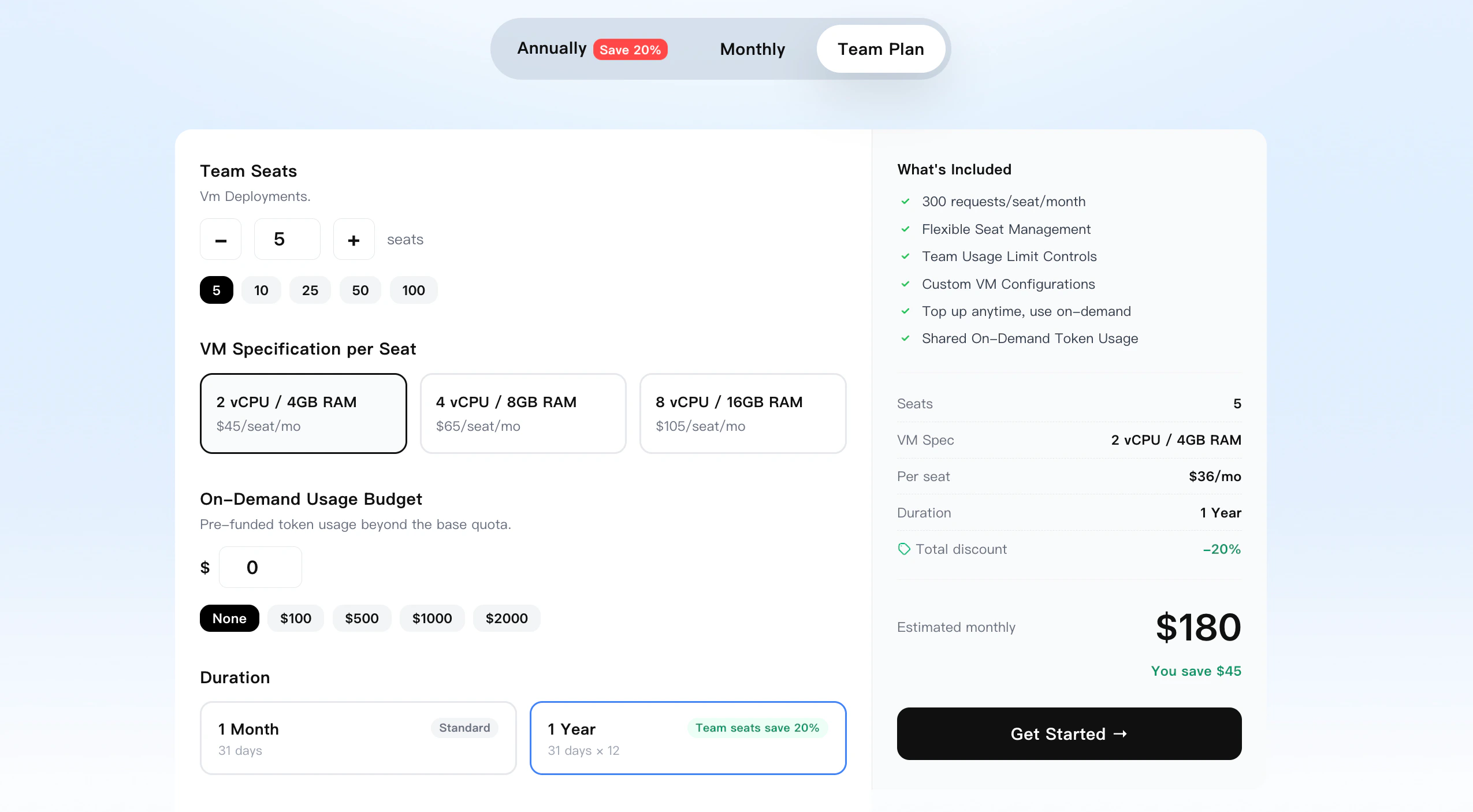 ### **Custom seats and shared token pool**
Team Plan supports flexible purchase configuration based on actual team needs:
* Seat quantity can be selected freely
* Minimum purchase starts from **1 seat**
* The token pool amount can be customized
* No minimum token pool amount is required
* A token pool of **\$0** is allowed
* The token pool is shared across the entire team
### **Validity period**
Team Plan supports multiple validity options:
* **1 month**
* **3 months**
* **6 months**
* **12 months**
### **Included token quota**
Each seat includes a fixed amount of token quota:
* **\$25 / seat / month**
Team Plan usage is also managed through member-level limits and the shared organization token pool.
### **VM tiers**
Each seat can be configured with one of three VM tiers:
* **2 vCPU / 4GB** — **\$45 / seat / month**
* **4 vCPU / 8GB** — **\$65 / seat / month**
* **8 vCPU / 16GB** — **\$105 / seat / month**
Team Plan seat pricing follows the same VM tier structure as Personal Plan.
***
## **Usage Entry**
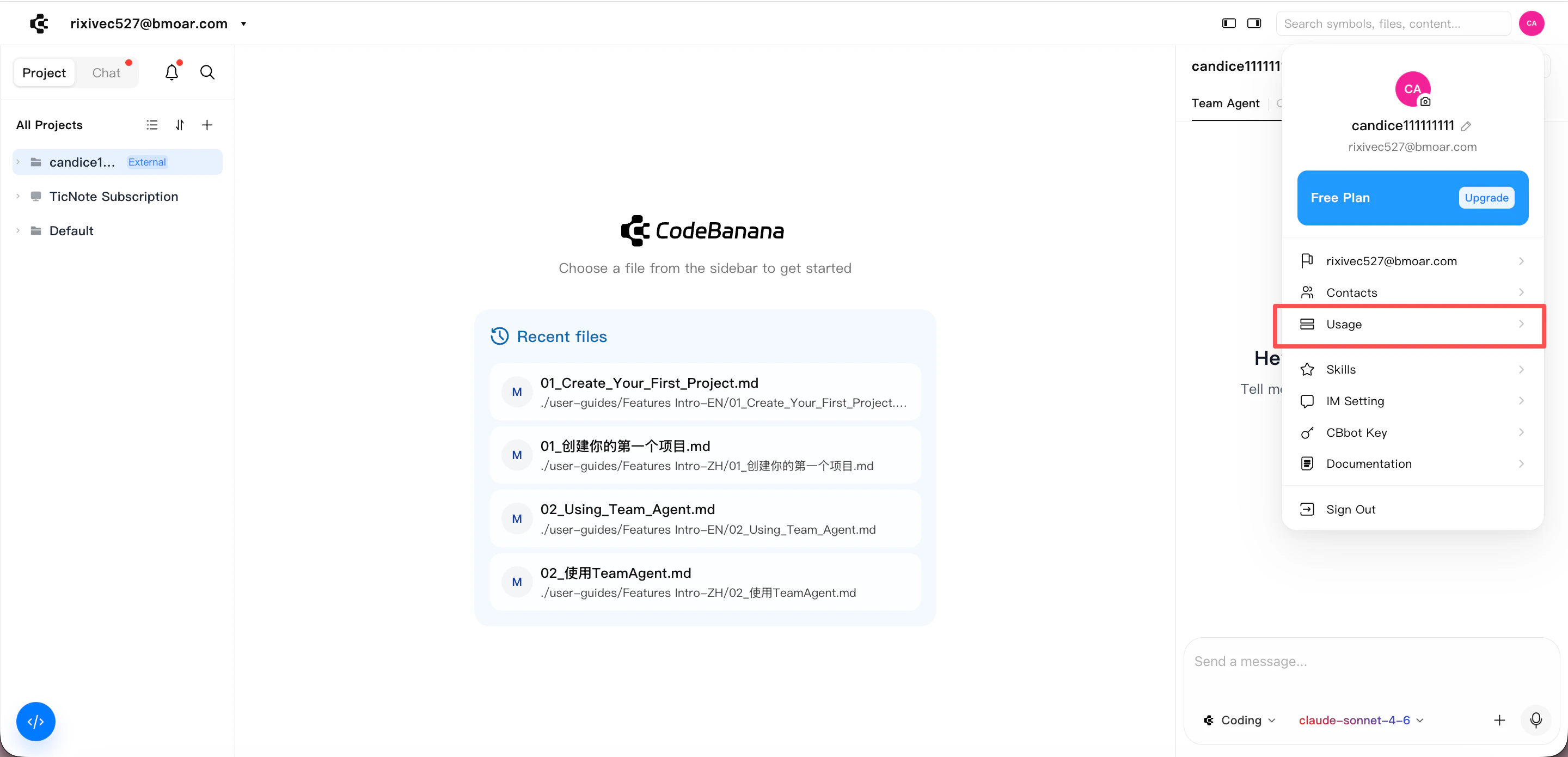
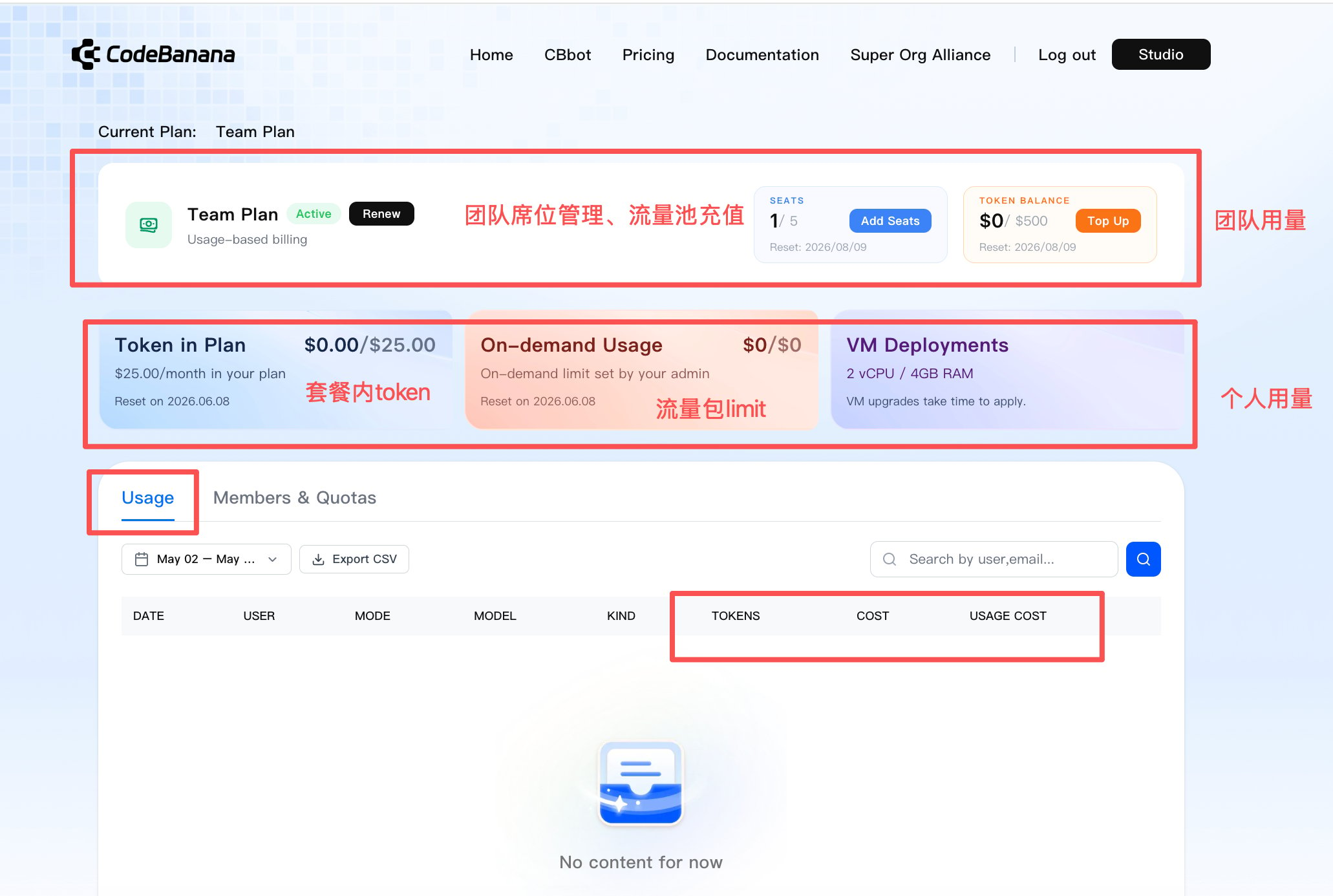
After purchasing Team Plan, admins can manage seats, token usage, and members from **Avatar → Usage**.
This is the main entry for:
* Team seat usage
* Token pool balance and consumption
* Member-level usage and limits
* Renewals
* Additional seat purchase
* Token top-up
### **Custom seats and shared token pool**
Team Plan supports flexible purchase configuration based on actual team needs:
* Seat quantity can be selected freely
* Minimum purchase starts from **1 seat**
* The token pool amount can be customized
* No minimum token pool amount is required
* A token pool of **\$0** is allowed
* The token pool is shared across the entire team
### **Validity period**
Team Plan supports multiple validity options:
* **1 month**
* **3 months**
* **6 months**
* **12 months**
### **Included token quota**
Each seat includes a fixed amount of token quota:
* **\$25 / seat / month**
Team Plan usage is also managed through member-level limits and the shared organization token pool.
### **VM tiers**
Each seat can be configured with one of three VM tiers:
* **2 vCPU / 4GB** — **\$45 / seat / month**
* **4 vCPU / 8GB** — **\$65 / seat / month**
* **8 vCPU / 16GB** — **\$105 / seat / month**
Team Plan seat pricing follows the same VM tier structure as Personal Plan.
***
## **Usage Entry**
After purchasing Team Plan, admins can manage seats, token usage, and members from **Avatar → Usage**.
This is the main entry for:
* Team seat usage
* Token pool balance and consumption
* Member-level usage and limits
* Renewals
* Additional seat purchase
* Token top-up
 ***
## **Usage Management**
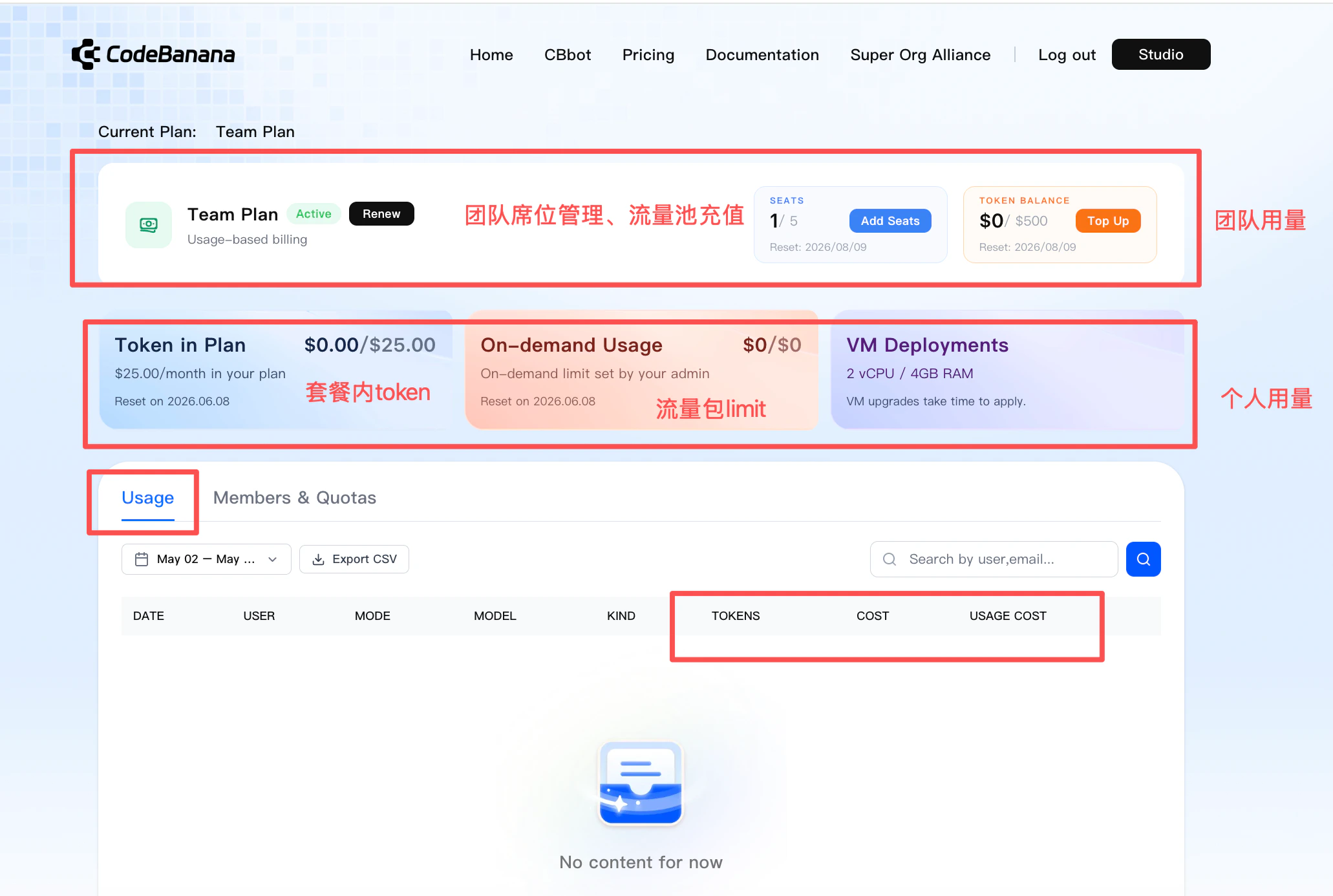
The **Usage** page provides both team-level and member-level visibility.
***
## **Usage Management**
The **Usage** page provides both team-level and member-level visibility.
 ### **Usage Alerts**
CodeBanana provides usage alerts for Team Plan across both member-level limits and the shared organization token pool.
**Member on-demand limit**
* A reminder is shown when a member’s remaining on-demand limit is **10% or less and no more than \$10**
* Each user receives this reminder at most **once per day**
* The reminder is triggered independently for each user
* The reminder asks the user to contact the organization owner or admin before usage is interrupted
***Reminder text***
> You're almost at your on-demand limit ({usedPct}% used). Reach out to your organization owner or admin to increase your limit before usage is interrupted.
**Shared organization token pool**
* A reminder is shown when the shared token pool balance falls below **10%**
* This reminder is intended for the organization owner or admin so the pool can be topped up in time
***Reminder text***
> Your organization's shared token budget is almost depleted — \${remaining} left. Please contact your organization owner or admin to top up soon and keep your team running smoothly.
### **Team usage (Admin view)**
Admins can view and manage:
* Seats used / total seats
* Shared token pool consumption
* Remaining token pool balance
* **Add Seats**
* **Top Up** for the token pool
Current limitation:
* Additional seats currently support only the **same VM tier** as the original Team Plan purchase
* More flexible mixed seat top-up modes will be supported in later iterations
Validity rule:
* Additional seats and token top-ups follow the same expiration date as the current Team Plan period
* If a seat is added during an active Team Plan period, both the added seat cost and its included token quota are prorated based on the remaining time in that period
### **Usage Alerts**
CodeBanana provides usage alerts for Team Plan across both member-level limits and the shared organization token pool.
**Member on-demand limit**
* A reminder is shown when a member’s remaining on-demand limit is **10% or less and no more than \$10**
* Each user receives this reminder at most **once per day**
* The reminder is triggered independently for each user
* The reminder asks the user to contact the organization owner or admin before usage is interrupted
***Reminder text***
> You're almost at your on-demand limit ({usedPct}% used). Reach out to your organization owner or admin to increase your limit before usage is interrupted.
**Shared organization token pool**
* A reminder is shown when the shared token pool balance falls below **10%**
* This reminder is intended for the organization owner or admin so the pool can be topped up in time
***Reminder text***
> Your organization's shared token budget is almost depleted — \${remaining} left. Please contact your organization owner or admin to top up soon and keep your team running smoothly.
### **Team usage (Admin view)**
Admins can view and manage:
* Seats used / total seats
* Shared token pool consumption
* Remaining token pool balance
* **Add Seats**
* **Top Up** for the token pool
Current limitation:
* Additional seats currently support only the **same VM tier** as the original Team Plan purchase
* More flexible mixed seat top-up modes will be supported in later iterations
Validity rule:
* Additional seats and token top-ups follow the same expiration date as the current Team Plan period
* If a seat is added during an active Team Plan period, both the added seat cost and its included token quota are prorated based on the remaining time in that period
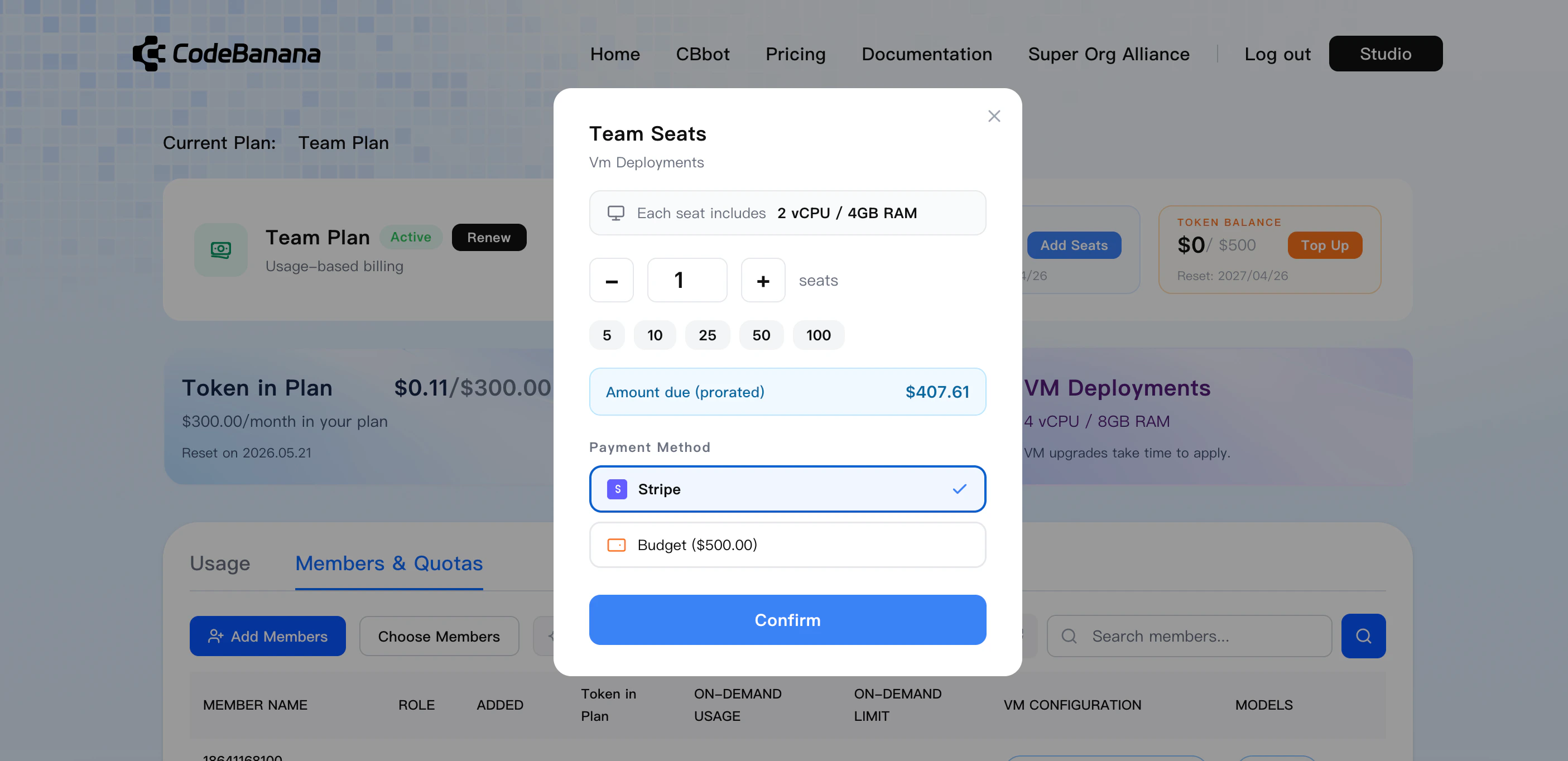 ### **Personal usage (Member view)**
Each member can view their own usage details, including:
* Personal token consumption amount
* Current token limit status
* Current VM configuration
***
## **Admin Controls**
Organization owners and admins can manage Team Plan configuration and usage.
### **Add members to Team Plan**
Click the avatar in the top-right corner.
Select **Usage** from the dropdown to enter the usage management page.
Switch to the **Members & Quotas** tab.
Click the blue **Add Members** button to open the member selection modal.
### **Personal usage (Member view)**
Each member can view their own usage details, including:
* Personal token consumption amount
* Current token limit status
* Current VM configuration
***
## **Admin Controls**
Organization owners and admins can manage Team Plan configuration and usage.
### **Add members to Team Plan**
Click the avatar in the top-right corner.
Select **Usage** from the dropdown to enter the usage management page.
Switch to the **Members & Quotas** tab.
Click the blue **Add Members** button to open the member selection modal.
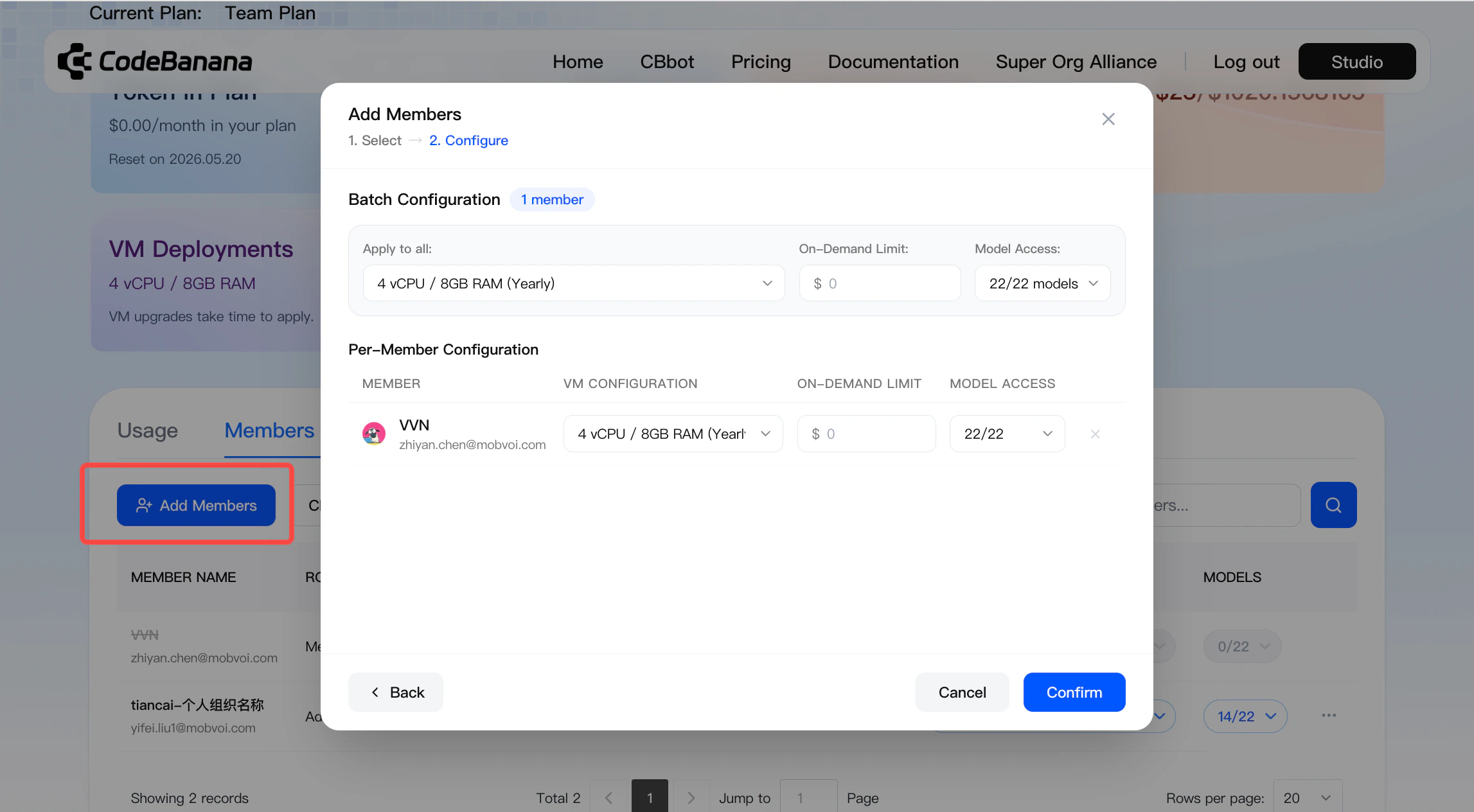 Admins can add members into Team Plan within the range of already purchased seats.
* Members must already belong to the organization
* Members can be selected directly from organization contacts
* Seats are assigned within the currently purchased quota
Before adding members to Team Plan, users must first join the organization. Only after the admin approves the request can seats be assigned.
### **Model usage limits**
Team Plan admins can restrict which AI models each team member is allowed to use, giving the organization more precise control over model usage and cost.
**Where to configure**
* Go to **Usage → Members & Quotas**
* Find the **Models** column in the member table
* Set model access for each member individually, or apply restrictions in bulk
Admins can add members into Team Plan within the range of already purchased seats.
* Members must already belong to the organization
* Members can be selected directly from organization contacts
* Seats are assigned within the currently purchased quota
Before adding members to Team Plan, users must first join the organization. Only after the admin approves the request can seats be assigned.
### **Model usage limits**
Team Plan admins can restrict which AI models each team member is allowed to use, giving the organization more precise control over model usage and cost.
**Where to configure**
* Go to **Usage → Members & Quotas**
* Find the **Models** column in the member table
* Set model access for each member individually, or apply restrictions in bulk
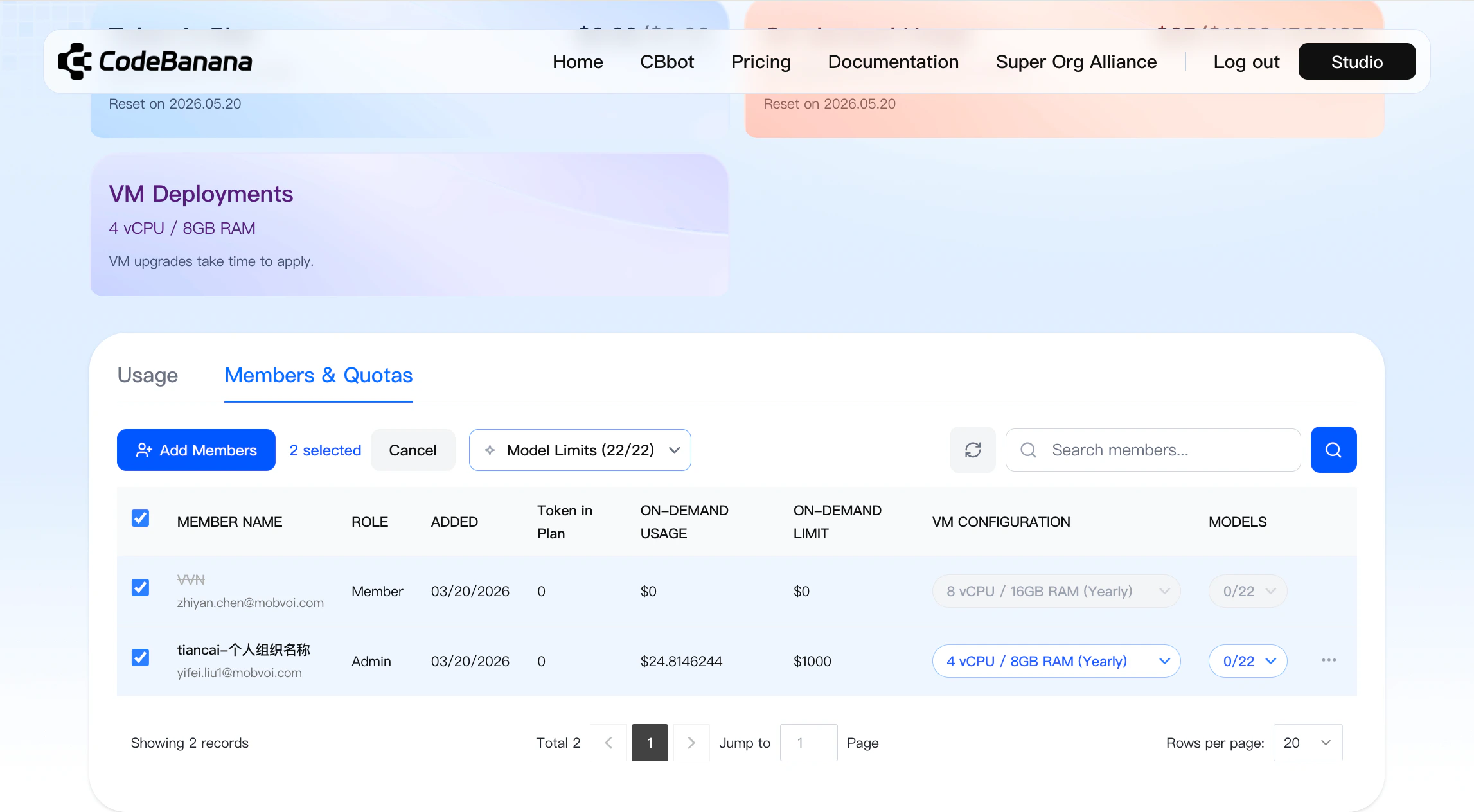 **Per-member model limits**
* Admins can open the **Models** selector for a specific member
* Each member can be set to:
* **All** — all available models
* **Selected models only** — only the checked models can be used
* Any model that is not selected will be unavailable to that member
**Per-member model limits**
* Admins can open the **Models** selector for a specific member
* Each member can be set to:
* **All** — all available models
* **Selected models only** — only the checked models can be used
* Any model that is not selected will be unavailable to that member
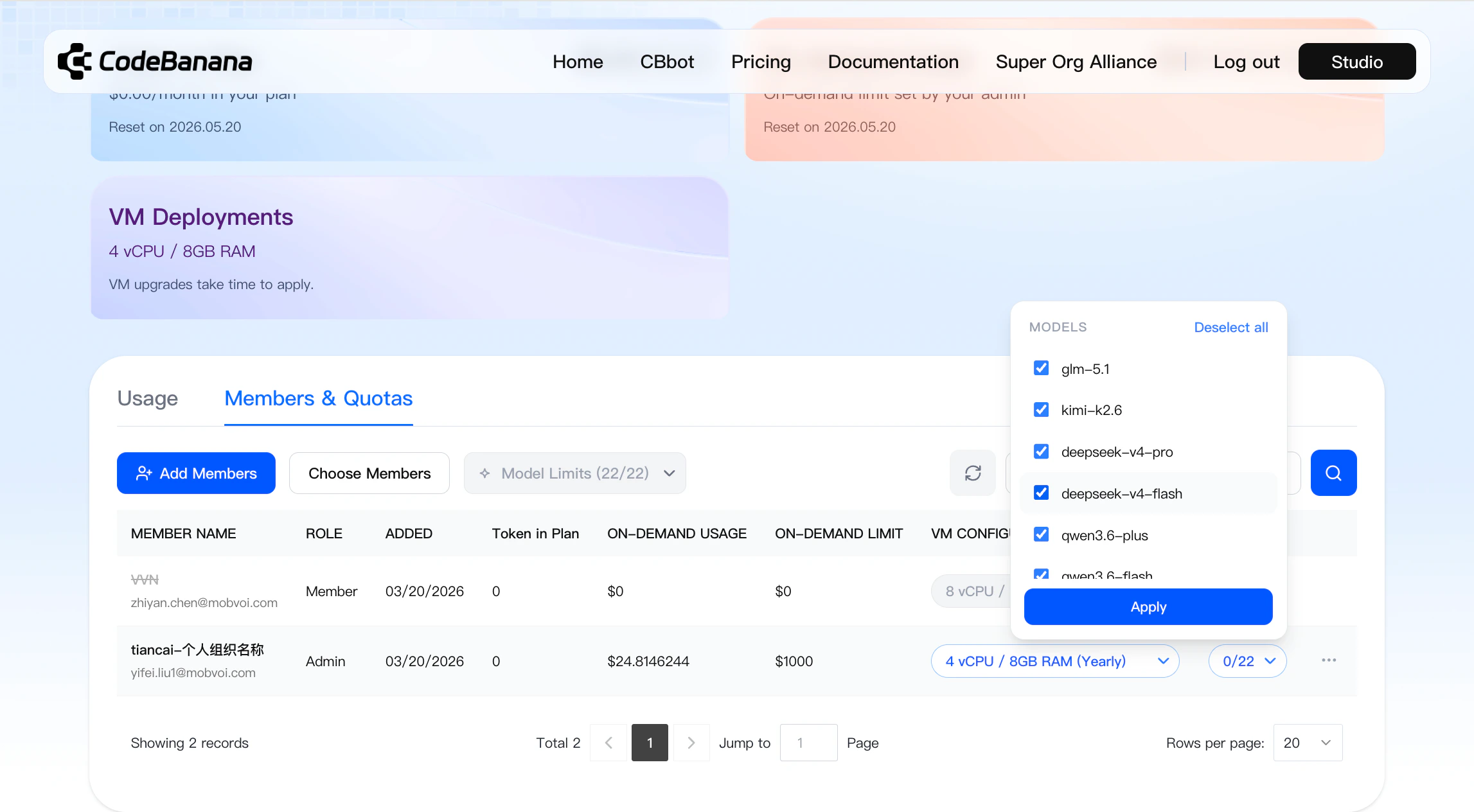 **Bulk model limits**
* Admins can select multiple members or use **Select All**
* After selecting members, admins can apply the same model access rules in one action
* This makes it easier to manage model permissions across larger teams
**Bulk model limits**
* Admins can select multiple members or use **Select All**
* After selecting members, admins can apply the same model access rules in one action
* This makes it easier to manage model permissions across larger teams
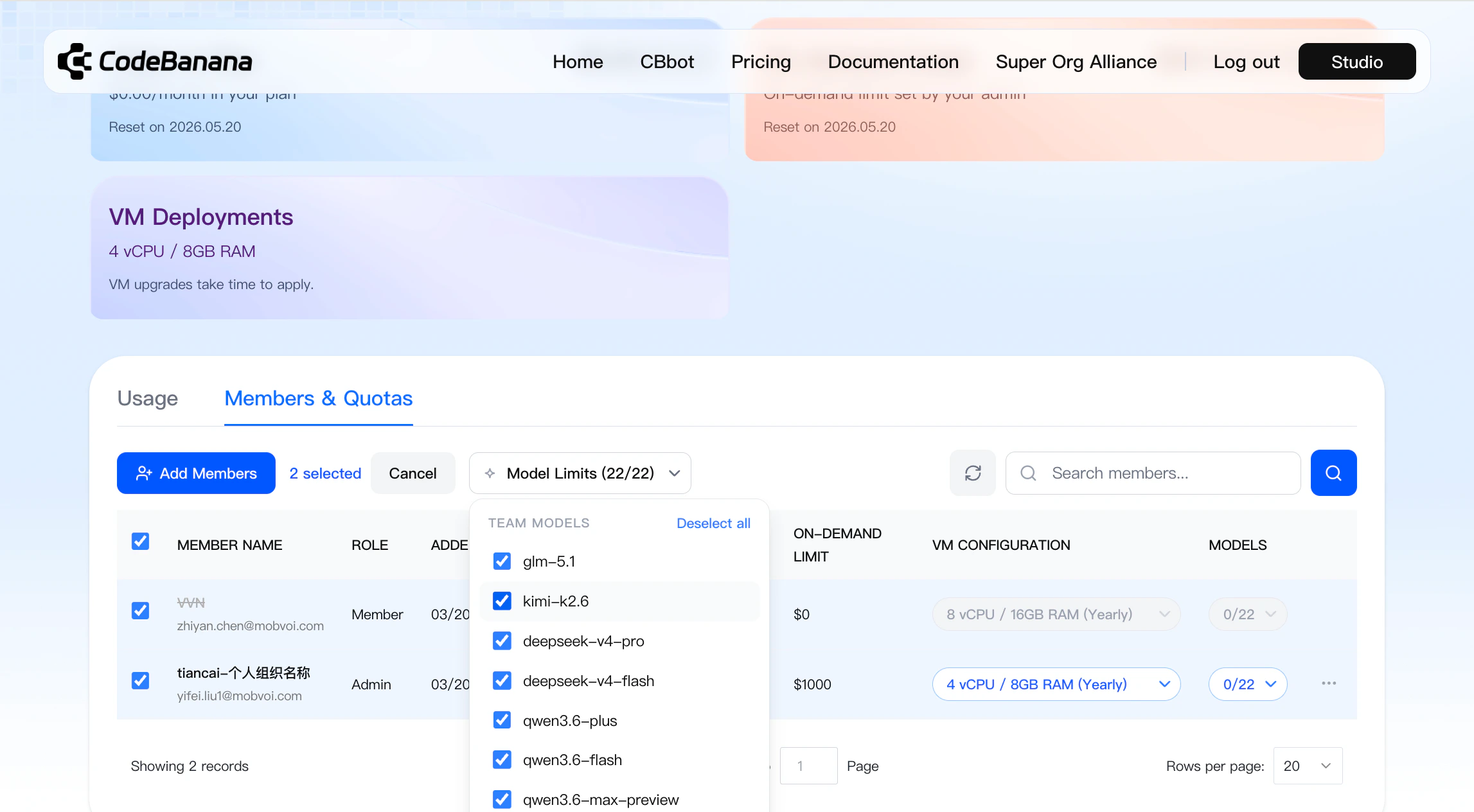 **Filtering and visibility**
* The **Model Limits** filter at the top of **Members & Quotas** helps admins quickly identify which members already have restricted model access
* Skill and project usage remain visible, but model availability is limited based on the admin’s configuration
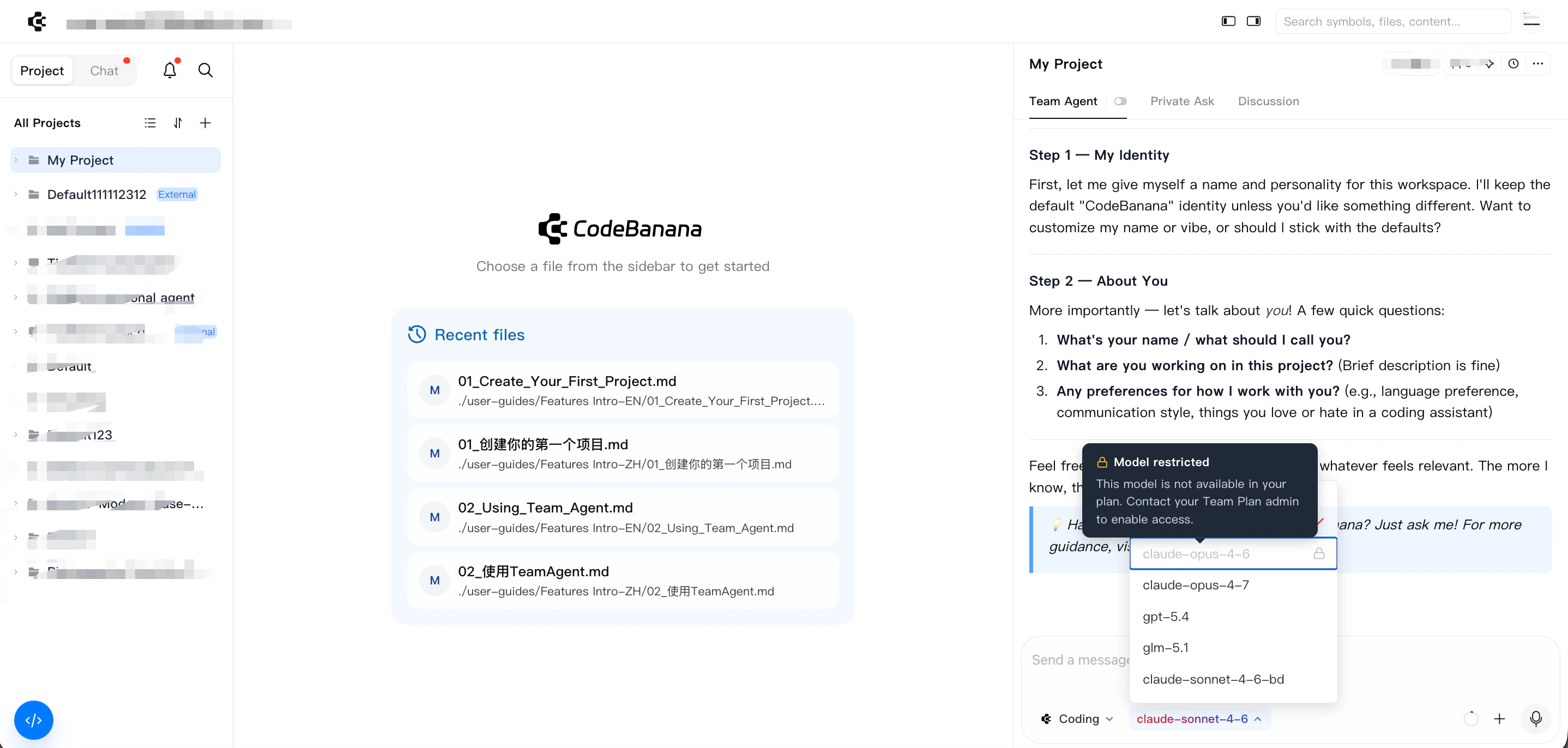
**Restriction scope**
* Model limits apply at the **member level**
* If a restricted member creates a project, everyone in that project will only be able to use the models allowed under that member’s restriction
* Unavailable models will appear disabled in the model selector
**Filtering and visibility**
* The **Model Limits** filter at the top of **Members & Quotas** helps admins quickly identify which members already have restricted model access
* Skill and project usage remain visible, but model availability is limited based on the admin’s configuration
**Restriction scope**
* Model limits apply at the **member level**
* If a restricted member creates a project, everyone in that project will only be able to use the models allowed under that member’s restriction
* Unavailable models will appear disabled in the model selector
 ### **Modify member plans**
Admins can update:
* Monthly token usage limits
* VM configuration
* Team Plan membership
**Limit controls**
* Members can only use token resources within the configured monthly limit
* Usage beyond the limit will be handled according to the current Team Plan limit and shared pool settings
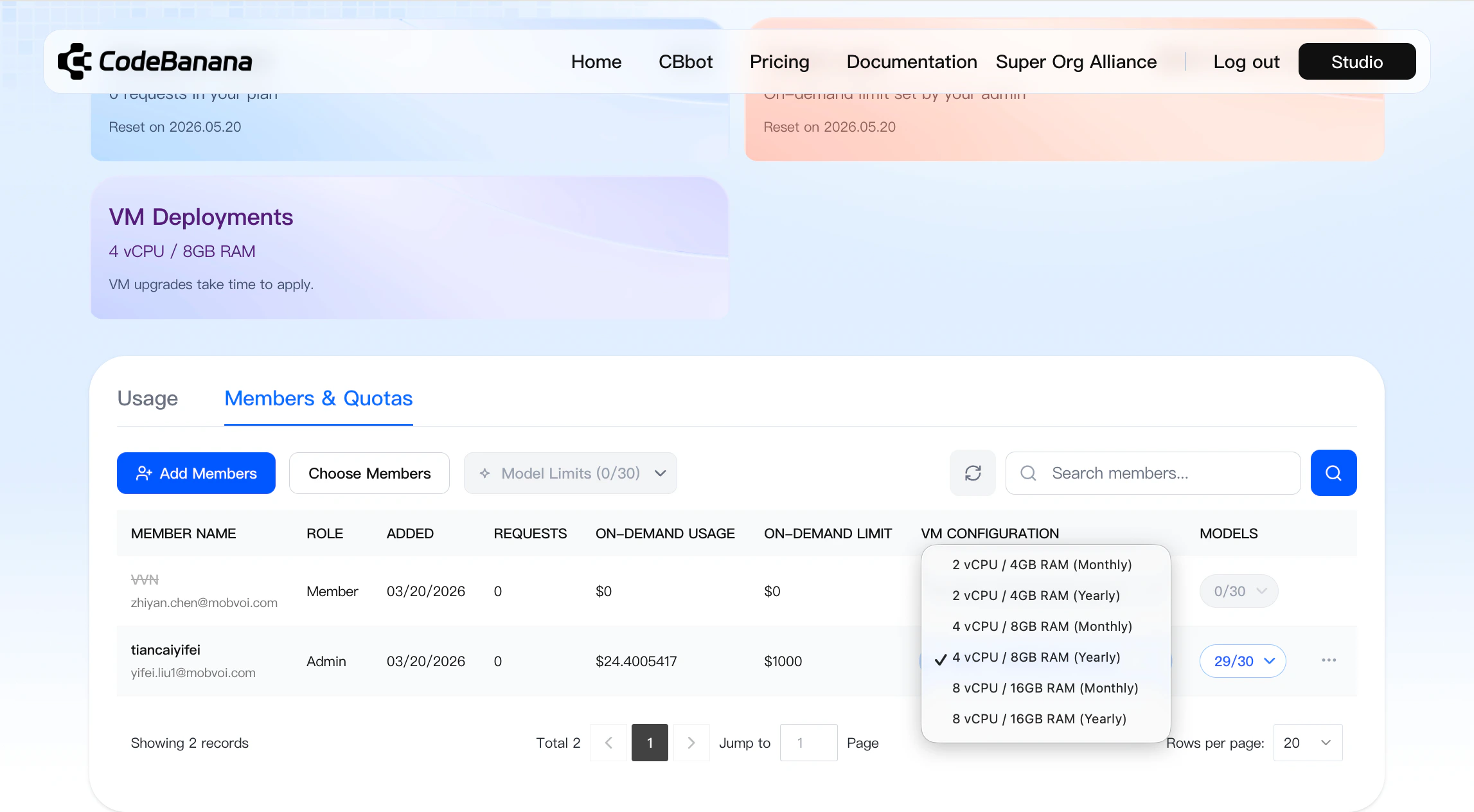
**VM upgrades**
* VM upgrades are supported
* Changes take effect immediately
If the shared token pool has sufficient balance:
* Upgrade costs can be deducted from the token pool
* Additional seat costs can also be deducted from the token pool
**VM downgrades**
* VM downgrades are **not currently supported**
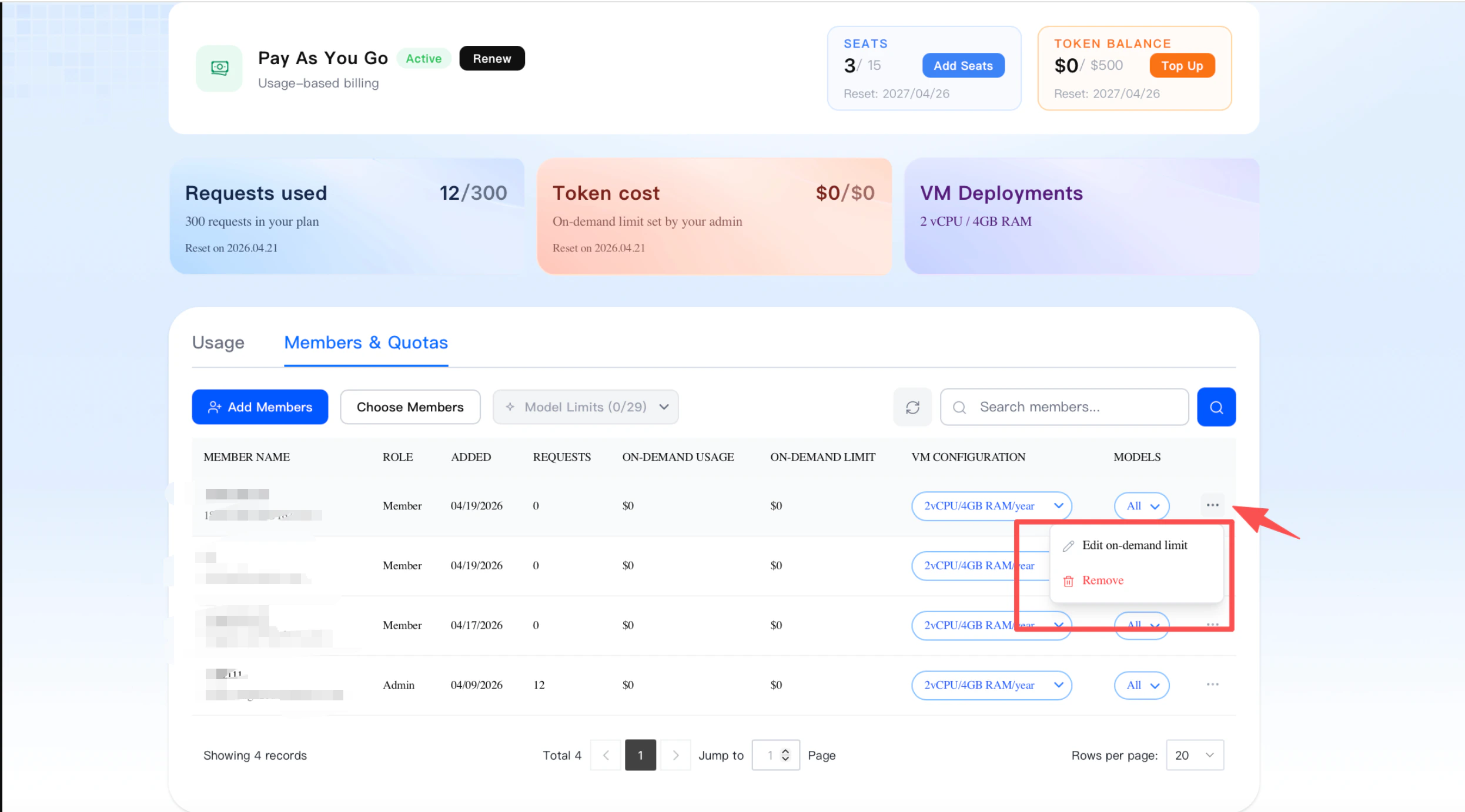
**Remove member**
* Team Plan members can be removed by the admin
* Removed seats can be reassigned to other members later within the purchased seat quota
### **Modify member plans**
Admins can update:
* Monthly token usage limits
* VM configuration
* Team Plan membership
**Limit controls**
* Members can only use token resources within the configured monthly limit
* Usage beyond the limit will be handled according to the current Team Plan limit and shared pool settings
**VM upgrades**
* VM upgrades are supported
* Changes take effect immediately
If the shared token pool has sufficient balance:
* Upgrade costs can be deducted from the token pool
* Additional seat costs can also be deducted from the token pool
**VM downgrades**
* VM downgrades are **not currently supported**
**Remove member**
* Team Plan members can be removed by the admin
* Removed seats can be reassigned to other members later within the purchased seat quota
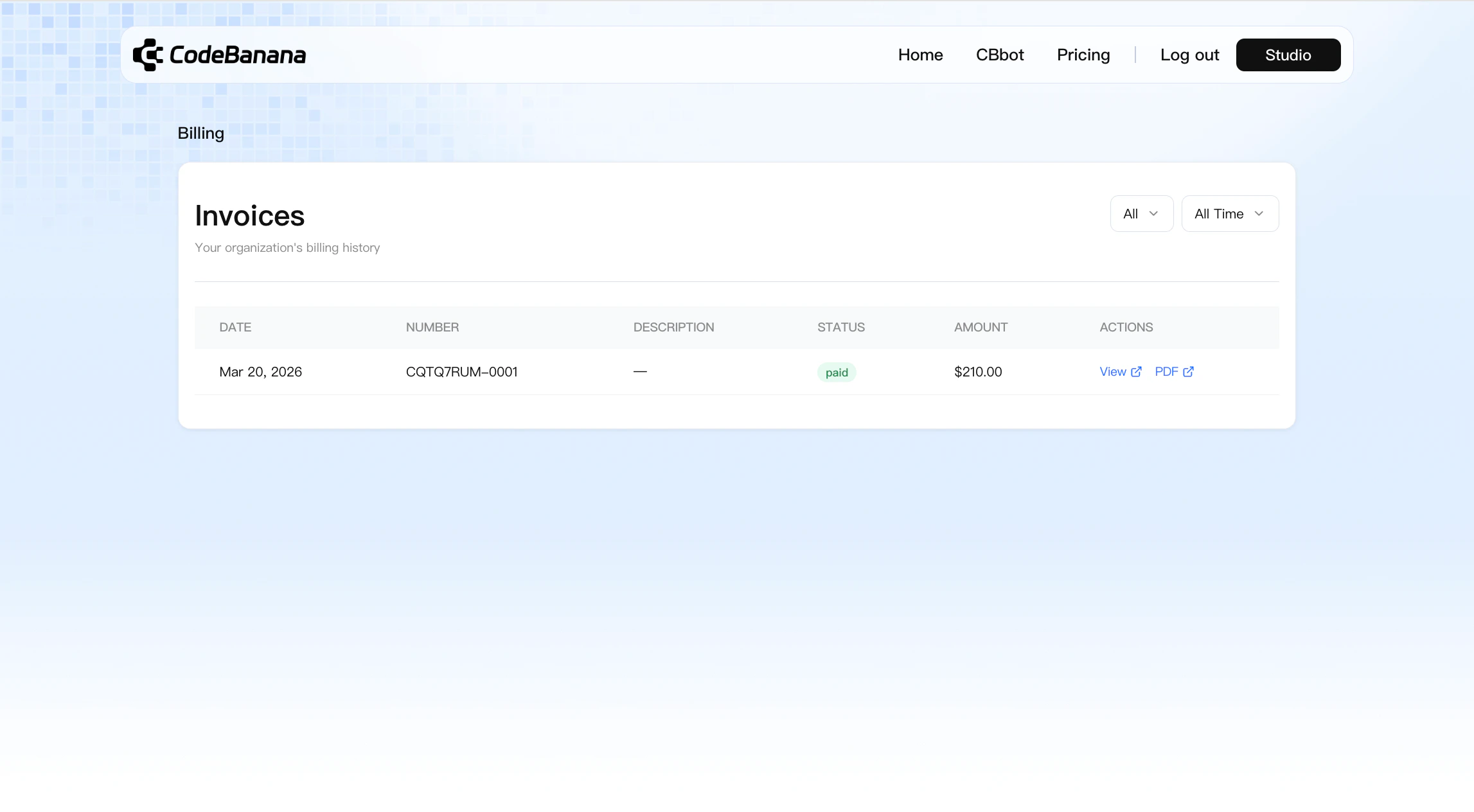
 **Billing management**
* All invoices are available in **Personal Center → Billing**
**Billing management**
* All invoices are available in **Personal Center → Billing**
 ***
## **Renewal**
Team Plan supports renewal before expiration.
Admins can renew the plan directly from the **Usage** page by clicking **Renew**.
This allows teams to continue using their seats and token pool without interruption
***
## **Enterprise Payment**
Team Plan also supports enterprise offline payment for contracted customers.
This option is designed for enterprise clients who do not manage purchases directly from the frontend.
For enterprise payment support, users should contact the CodeBanana team.
***
## **Visibility of Time Information**
Team Plan provides visibility into expiration and reset timelines.
***
## **Renewal**
Team Plan supports renewal before expiration.
Admins can renew the plan directly from the **Usage** page by clicking **Renew**.
This allows teams to continue using their seats and token pool without interruption
***
## **Enterprise Payment**
Team Plan also supports enterprise offline payment for contracted customers.
This option is designed for enterprise clients who do not manage purchases directly from the frontend.
For enterprise payment support, users should contact the CodeBanana team.
***
## **Visibility of Time Information**
Team Plan provides visibility into expiration and reset timelines.
 ### **Owner can view**
* Team Plan seat expiration time
* Token pool expiration time
* Reset time for member on-demand limits
### **Member can view**
* Their own on-demand limit reset time
### **Everyone can view**
* The time when a member was added to Team Plan
* This is shown in the **Added** column of **Members & Quotas**
***
## **What’s Included**
Team Plan includes the following benefits:
* **\$25 token quota / seat / month**\
Each seat includes a fixed monthly token quota
* **Flexible Seat Management**\
Admins can manage Team Plan members at any time, and later add seats or top up the token pool
* **Team Usage Limit Controls**\
Admins can set monthly token usage limits for members to better control spending
* **Custom VM Configurations**\
Member VM configurations can be upgraded as needed
* **Top up anytime, use on-demand**\
The token pool can be recharged at any time, with no minimum threshold
* **Shared On-Demand Token Usage**\
Team members share a common token resource pool for more flexible team-level usage allocation
***
## **Transition Note**
The new Team Plan replaces the previous version.
Existing Team Plan users are not affected by the transition. They can continue using their current Team Plan benefits until those benefits expire or are fully used.
***
## FAQs
Answers to common questions about Team Plan.
Team Plan can be purchased from **Pricing → Team Plan**.
Yes. Team Plan supports customizable seat counts, starting from a minimum of **1 seat**.
Team Plan supports **1, 3, 6, and 12 months**.
No. The token pool amount is fully customizable, and **\$0** is allowed.
Yes. The token pool is shared across all members in the Team Plan and can be used on demand.
Team Plan usage can continue according to the current organization token pool and member limit configuration.
Yes. Each seat can be configured independently, and admins can also upgrade VM configurations later for individual members.
No. VM upgrades are supported, but downgrades are currently unavailable.
Yes. Admins can use **Add Seats** from the Usage page. At the moment, additional seats must use the same VM tier as the original purchase.
If you add a seat during an active Team Plan period, the added seat will follow the same expiration date as the current Team Plan.
Both the additional seat cost and the included token quota are **prorated based on the remaining time** in the current period.
For example, if your Team Plan runs from **June 1 to June 30** and you add a seat on **June 15**, the added seat will expire on **June 30**, and both the seat fee and the included token quota will be calculated proportionally for the remaining period.
Yes. Admins can use **Top Up** from the Usage page to recharge the shared token pool at any time.
Yes. If the shared token pool has sufficient balance, additional seat costs and member VM upgrade costs can be deducted from the token pool.
Admins can add members from **Usage → Members & Quotas**, as long as the members are already in the organization and there are available purchased seats.
Team Plan supports member-level token limits so organizations can control usage more precisely. When a member approaches their configured on-demand limit, CodeBanana may show a reminder based on the current warning rules. Limit handling and available usage also depend on the organization’s shared token pool configuration.
Yes. In **Usage → Members & Quotas**, admins can configure model access for each member through the **Models** column. Members can be allowed to use all models or only a selected set. If a restricted member creates a project, everyone in that project will only be able to use the models allowed under that member’s restriction.
Team Plan uses different warning rules for different types of usage.
* A member receives a reminder when their remaining on-demand limit is **10% or less and no more than \$10**
* The organization owner or admin receives a reminder when the shared token pool balance falls below **10%**
Team Plan can be renewed from the **Usage** page by clicking **Renew** before expiration.
Yes. Enterprise customers can contact the CodeBanana team for offline payment support.
No. Existing Team Plan users are not affected by the transition. They can continue using their current Team Plan benefits until those benefits expire or are fully used.
### **Owner can view**
* Team Plan seat expiration time
* Token pool expiration time
* Reset time for member on-demand limits
### **Member can view**
* Their own on-demand limit reset time
### **Everyone can view**
* The time when a member was added to Team Plan
* This is shown in the **Added** column of **Members & Quotas**
***
## **What’s Included**
Team Plan includes the following benefits:
* **\$25 token quota / seat / month**\
Each seat includes a fixed monthly token quota
* **Flexible Seat Management**\
Admins can manage Team Plan members at any time, and later add seats or top up the token pool
* **Team Usage Limit Controls**\
Admins can set monthly token usage limits for members to better control spending
* **Custom VM Configurations**\
Member VM configurations can be upgraded as needed
* **Top up anytime, use on-demand**\
The token pool can be recharged at any time, with no minimum threshold
* **Shared On-Demand Token Usage**\
Team members share a common token resource pool for more flexible team-level usage allocation
***
## **Transition Note**
The new Team Plan replaces the previous version.
Existing Team Plan users are not affected by the transition. They can continue using their current Team Plan benefits until those benefits expire or are fully used.
***
## FAQs
Answers to common questions about Team Plan.
Team Plan can be purchased from **Pricing → Team Plan**.
Yes. Team Plan supports customizable seat counts, starting from a minimum of **1 seat**.
Team Plan supports **1, 3, 6, and 12 months**.
No. The token pool amount is fully customizable, and **\$0** is allowed.
Yes. The token pool is shared across all members in the Team Plan and can be used on demand.
Team Plan usage can continue according to the current organization token pool and member limit configuration.
Yes. Each seat can be configured independently, and admins can also upgrade VM configurations later for individual members.
No. VM upgrades are supported, but downgrades are currently unavailable.
Yes. Admins can use **Add Seats** from the Usage page. At the moment, additional seats must use the same VM tier as the original purchase.
If you add a seat during an active Team Plan period, the added seat will follow the same expiration date as the current Team Plan.
Both the additional seat cost and the included token quota are **prorated based on the remaining time** in the current period.
For example, if your Team Plan runs from **June 1 to June 30** and you add a seat on **June 15**, the added seat will expire on **June 30**, and both the seat fee and the included token quota will be calculated proportionally for the remaining period.
Yes. Admins can use **Top Up** from the Usage page to recharge the shared token pool at any time.
Yes. If the shared token pool has sufficient balance, additional seat costs and member VM upgrade costs can be deducted from the token pool.
Admins can add members from **Usage → Members & Quotas**, as long as the members are already in the organization and there are available purchased seats.
Team Plan supports member-level token limits so organizations can control usage more precisely. When a member approaches their configured on-demand limit, CodeBanana may show a reminder based on the current warning rules. Limit handling and available usage also depend on the organization’s shared token pool configuration.
Yes. In **Usage → Members & Quotas**, admins can configure model access for each member through the **Models** column. Members can be allowed to use all models or only a selected set. If a restricted member creates a project, everyone in that project will only be able to use the models allowed under that member’s restriction.
Team Plan uses different warning rules for different types of usage.
* A member receives a reminder when their remaining on-demand limit is **10% or less and no more than \$10**
* The organization owner or admin receives a reminder when the shared token pool balance falls below **10%**
Team Plan can be renewed from the **Usage** page by clicking **Renew** before expiration.
Yes. Enterprise customers can contact the CodeBanana team for offline payment support.
No. Existing Team Plan users are not affected by the transition. They can continue using their current Team Plan benefits until those benefits expire or are fully used.